Event marketing success depends on coordinated execution across multiple channels, consistent messaging, and the ability to track what's working in real time. An event marketing platform centralizes these functions, letting teams plan campaigns, distribute content, and measure results without juggling disconnected tools.
This guide explains what these platforms do, how they operate, which features matter most, and how to pick one that fits your event goals and team structure.
What Is an Event Marketing Platform
An event marketing platform is software designed to plan, execute, and measure promotional campaigns for events. It brings together email marketing, social media scheduling, content management, audience segmentation, and analytics into a unified system. The core purpose is to streamline multichannel promotion and provide visibility into which tactics drive registrations, attendance, and engagement.
These platforms differ from event management software, which focuses on logistics—venue booking, attendee check-in, badge printing, and session scheduling. They also aren't ticketing systems, which handle payment processing and access control. An event marketing suite sits upstream, handling the promotional work that fills the registration pipeline. Some vendors bundle marketing, management, and ticketing into one package, but the marketing layer remains distinct in function.
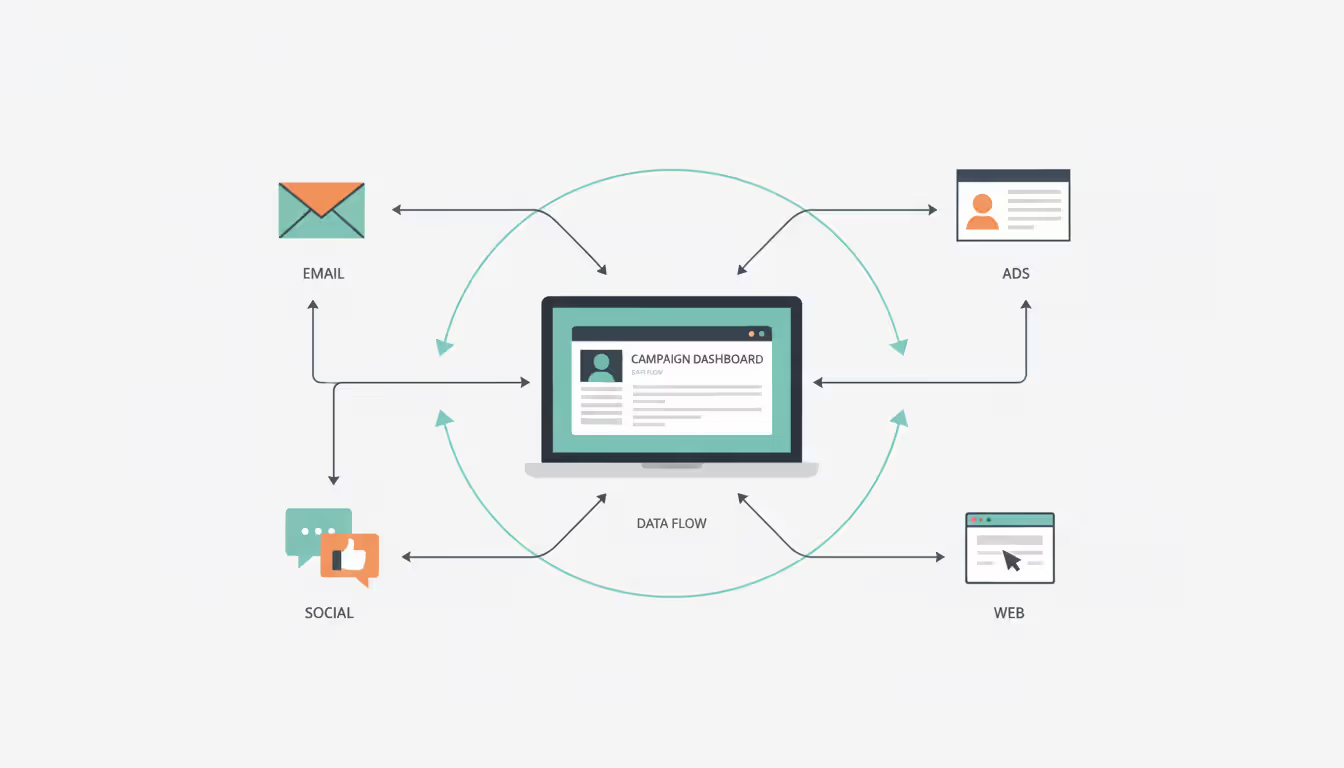
Event integrated marketing means connecting your promotional channels so a single campaign can trigger emails, post to social accounts, update landing pages, and retarget ads—all from one workflow. Instead of logging into separate tools for each channel, you build the campaign once, define audience segments, set timing rules, and let the platform coordinate delivery. This reduces manual handoffs, keeps messaging consistent, and makes it easier to compare performance across channels.
How Event Marketing Platforms Work
The typical workflow starts with campaign creation. You define your event details—date, location, audience, goals—and build promotional assets: email templates, social posts, landing page copy, graphics. The platform stores these in a content library, often with version control and approval workflows for larger teams.
Next comes multichannel distribution. You map out a timeline: a save-the-date email three months out, LinkedIn posts twice a week, retargeting ads for site visitors who didn't register, reminder emails two weeks before the event. The event campaign management module schedules each touchpoint, applying audience filters so VIP contacts get personalized invitations while general prospects see broader messaging.
Author: Sophie Langford;
Source: musiconmainstreet.com
Automation handles repetitive tasks. When someone registers, the platform can send a confirmation email, add them to a "registered" segment, suppress them from future registration emails, and trigger a series of pre-event reminders. If a contact opens three emails but doesn't register, the system can flag them for a sales follow-up or add them to a higher-frequency nurture track.
User roles matter for teams. Marketing managers set strategy and approve content. Designers upload assets. Coordinators schedule posts and monitor inboxes. Analysts pull reports. The platform assigns permissions so each person sees only the tools they need, reducing clutter and preventing accidental changes to live campaigns.
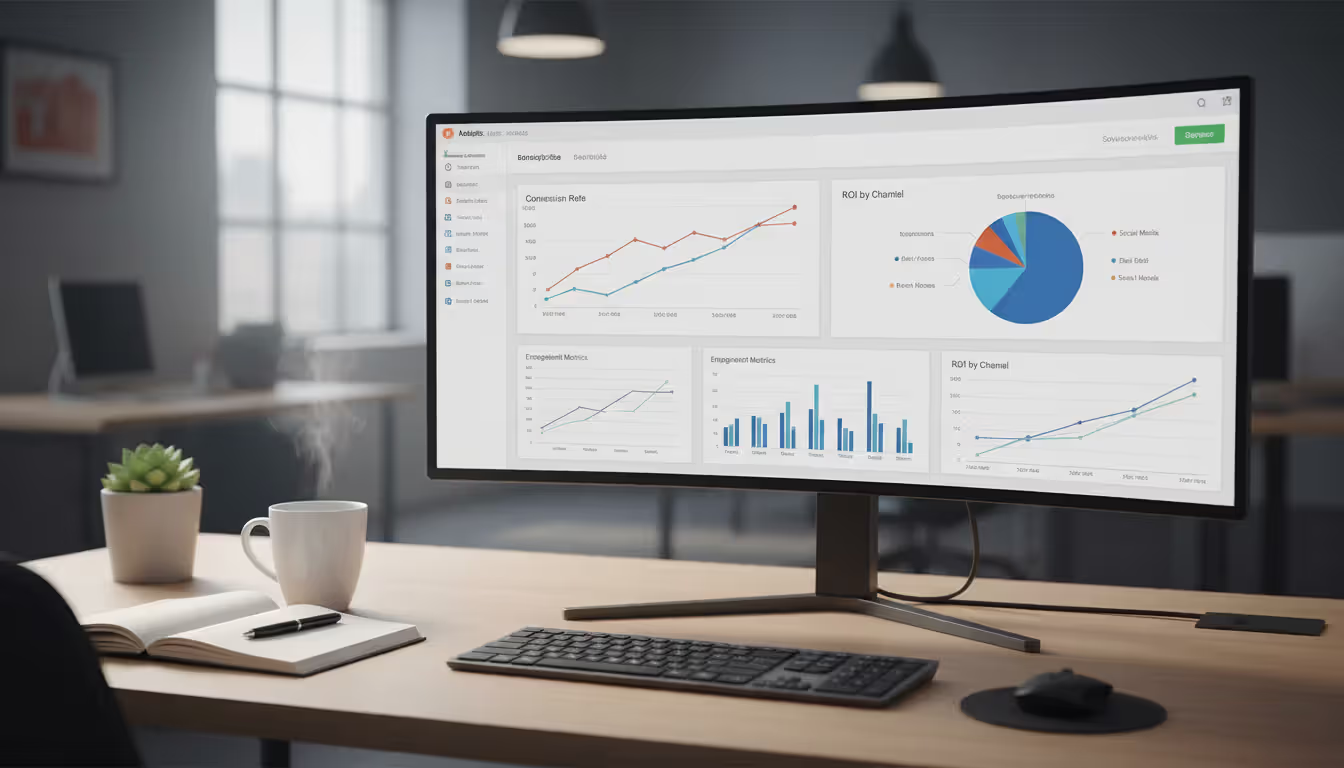
Integrations connect the platform to your CRM, marketing automation system, webinar software, and analytics tools. When a contact registers through your event landing page, their record updates in the CRM with event attendance status. When they attend a webinar, the platform logs that activity and adjusts future messaging. The event marketing dashboard pulls data from all these sources, showing registrations, email open rates, social engagement, and conversion paths in one view.
Event multichannel marketing depends on this coordination. A prospect might see a LinkedIn ad, visit your landing page, leave without registering, receive a follow-up email, click through, and finally register. The platform tracks each step, attributing the conversion appropriately instead of crediting only the last touchpoint.
Key Features to Look For
Not every platform offers the same depth in each area. Prioritize features based on your event type, team size, and reporting needs.
Email and Social Media Marketing Tools
Email remains the highest-converting channel for event promotion. Look for an event email marketing platform that supports segmentation beyond basic demographics—behavioral triggers, engagement scoring, and dynamic content blocks that change based on recipient attributes. A B2B conference might send different emails to past attendees, first-time registrants, and contacts who attended competitor events.
Template builders should allow custom HTML or drag-and-drop design, with mobile preview and spam-check tools. Deliverability monitoring catches issues before they tank open rates—flagging authentication problems, blacklist warnings, or sudden bounce spikes.
Event social media marketing tools should cover scheduling, publishing, and monitoring across major platforms. Native integrations with LinkedIn, X, Facebook, and Instagram let you post directly without switching tabs. Advanced platforms offer social listening—tracking mentions of your event hashtag, competitor events, or industry keywords—so you can join conversations and identify influencers to partner with.
Look for asset libraries that store approved images, logos, and copy snippets, making it easy to maintain brand consistency across dozens of posts. Approval workflows prevent off-brand content from going live, especially important when multiple team members contribute.
Campaign Management and Automation
Campaign management tools organize all the moving parts of a promotion. A visual calendar shows every email, post, ad, and content piece on a timeline, color-coded by channel or audience segment. Drag-and-drop rescheduling adjusts dependent tasks automatically—if you push the event date back two weeks, all reminder emails shift accordingly.
Automation workflows reduce manual effort. Common patterns include:
Registration nurture: Confirmed attendees receive a welcome series with event details, speaker bios, and networking tips.
Abandoned registration: Contacts who started but didn't complete registration get a reminder email within an hour.
Engagement scoring: Contacts who open multiple emails or visit the agenda page repeatedly trigger a sales alert.
Post-event follow-up: Attendees receive a thank-you email, survey link, and content recap; no-shows get an on-demand recording.
The best platforms let you build these workflows with if/then logic, wait steps, and A/B test variations without writing code. When a rule breaks or a workflow stalls, clear error messages and logs help you troubleshoot quickly.
Analytics and ROI Tracking
Event marketing reporting must connect promotional activity to business outcomes. Vanity metrics—email opens, social likes—matter less than registrations, attendance rates, pipeline generated, and revenue attributed to the event.
An event marketing ROI platform tracks costs across all channels—email tool subscriptions, ad spend, design contractor fees, platform licensing—and compares them to measurable returns. For a paid conference, that's ticket revenue minus costs. For a lead-gen webinar, it's the pipeline value of attendees who later became opportunities, adjusted for your average close rate and deal size.
Attribution modeling shows which channels contribute most. First-touch attribution credits the initial interaction; last-touch credits the final step before registration; multi-touch distributes credit across all touchpoints. Most platforms default to last-touch because it's simplest, but multi-touch gives a clearer picture for long sales cycles.
Dashboards should update in real time, not overnight batch processes. If you launch a social campaign at 10 a.m., you want to see click and registration data by noon so you can adjust targeting or creative before the day ends. Customizable widgets let you build views for different stakeholders—executives see high-level ROI, campaign managers see channel breakdowns, content teams see asset performance.
Author: Sophie Langford;
Source: musiconmainstreet.com
Types of Events That Benefit Most
Any event with a promotional phase benefits, but certain types see outsized gains from integrated platforms.
Corporate events—annual meetings, town halls, training sessions—often have large internal audiences and tight timelines. An event promotion platform automates invitations, tracks RSVPs, sends calendar invites, and reminds attendees the day before. For companies with thousands of employees across regions, this beats spreadsheet tracking and manual follow-ups.
Conferences and trade shows require sustained promotion over months, with multiple ticket tiers, speaker announcements, and sponsor integrations. Platforms manage early-bird pricing deadlines, send personalized agendas based on attendee interests, and coordinate co-marketing campaigns with sponsors who want to promote their booth or session.
Webinars benefit from automated reminder sequences—registrants who don't show up cost you nothing in physical space, but high no-show rates waste content and presenter time. Three-email reminder sequences (one week out, one day out, one hour out) typically lift attendance 15–25 percentage points compared to a single confirmation email.
Product launches combine event marketing with broader campaigns. A platform can coordinate a launch webinar, in-person demo events in multiple cities, social media countdowns, influencer partnerships, and press outreach, ensuring all channels peak simultaneously for maximum impact.
Author: Sophie Langford;
Source: musiconmainstreet.com
Trade shows and expos where you're an exhibitor rather than the organizer still need promotion. Pre-show campaigns drive booth traffic; post-show follow-ups nurture leads collected on the floor. Integrating badge scanner data with your platform lets you trigger personalized follow-ups based on which sessions a lead attended or how long they spent at your booth.
Small events—under 50 attendees—can often manage with basic email tools and manual social posting. The ROI threshold for a full platform typically kicks in around 100–200 registrations, where the time saved and conversion lift justify the cost.
How to Choose the Right Platform for Your Needs
Start by defining your requirements across five dimensions.
Budget includes licensing fees, implementation costs, training, and ongoing support. Entry-level platforms start around $200–$500 per month for small teams and basic features. Mid-market solutions run $1,000–$5,000 monthly with advanced automation and integrations. Enterprise platforms with custom workflows, dedicated support, and white-glove onboarding can exceed $10,000 monthly. Calculate cost per event and cost per registration to compare options on equal footing.
Team size and structure shape which features you need. A solo marketer needs an intuitive interface and pre-built templates; a ten-person team needs role-based permissions, approval workflows, and collaboration tools. If your team spans marketing, sales, and event operations, look for platforms that let each group access relevant data without overwhelming them with irrelevant features.
Integrations determine how well the platform fits your existing stack. Must-haves include your CRM (Salesforce, HubSpot, Microsoft Dynamics), marketing automation (Marketo, Pardot, Eloqua), webinar tools (Zoom, Webex, ON24), and analytics (Google Analytics, Tableau, Looker). Check whether integrations are native (built by the vendor), third-party (via Zapier or similar), or require custom API work. Native integrations sync faster and break less often.
Reporting needs vary by stakeholder. If your CFO demands ROI reports tying event spend to closed revenue, you need multi-touch attribution and CRM integration deep enough to track deals through close. If you mainly report to a VP of Marketing who cares about lead volume and engagement, channel-level analytics and engagement scoring suffice.
Ease of use matters more than feature lists if your team lacks technical depth. A platform with 200 features you can't figure out loses to one with 50 features you can deploy immediately. Request a trial focused on your actual use case—building a real campaign, not a vendor's canned demo. Time how long it takes to set up an email workflow, schedule social posts, and pull a report. If it feels clunky in the trial, it won't get easier under deadline pressure.
Author: Sophie Langford;
Source: musiconmainstreet.com
Evaluation process:
List your top three events from the past year and map every promotional task—emails sent, social posts, ads run, landing pages built, reports generated.
Score each task by time spent and business impact. High-impact, high-effort tasks are your automation targets.
Shortlist three platforms that cover 80% of your high-priority tasks.
Run parallel trials: build the same campaign in each platform, tracking setup time, ease of use, and results quality.
Involve end users—the people who'll use the platform daily—in the trial. Their feedback matters more than executive impressions from a sales pitch.
Check references from companies in your industry and event size range. Ask about implementation surprises, support responsiveness, and hidden costs.
Common Mistakes When Selecting a Platform
The difference between a successful event and a mediocre one often comes down to marketing execution, not the event itself. An integrated platform eliminates the chaos of juggling tools, letting your team focus on strategy and creativity instead of administrative busywork. When you can see exactly which promotional efforts drive registrations and measure ROI down to the channel level, you make smarter investments and prove marketing's value to the business
— Sarah Chen
Overlooking integration needs is the most expensive mistake. A platform that can't sync with your CRM creates manual data entry work, duplicate records, and reporting gaps. Before signing, confirm that critical integrations exist, check their sync frequency (real-time vs. hourly vs. daily), and ask whether they support bidirectional data flow or just one-way pushes.
Ignoring reporting depth becomes painful when your boss asks for ROI data you can't produce. Surface-level dashboards show email opens and click rates but don't connect them to registrations, attendance, or revenue. If your events justify their budget through pipeline or revenue contribution, make sure the platform tracks those metrics and attributes them correctly.
Choosing based on price alone often backfires. A cheap platform that requires 20 hours of manual work per event costs more than a pricier one that automates those tasks. Calculate total cost of ownership: licensing + implementation + training + ongoing admin time. A $500/month platform that needs a part-time admin ($2,000/month in labor) is more expensive than a $2,000/month platform with full automation.
Not testing multichannel capabilities in realistic scenarios leads to disappointment. A platform might claim social media tools, but if it only posts to Facebook and LinkedIn while your audience lives on X and Instagram, you'll still need separate tools. During trials, test every channel you plan to use, not just the vendor's flagship features.
Skipping scalability questions creates problems as you grow. If you run two events a year now but plan to scale to ten, confirm the platform handles multiple concurrent campaigns without performance degradation or requiring a plan upgrade. Ask about user limits, contact database caps, and email send volume restrictions.
Ignoring user adoption risks dooms many implementations. A powerful platform your team won't use delivers zero ROI. During trials, watch for red flags: unintuitive navigation, poor mobile experience, slow load times, jargon-heavy interfaces. If your team struggles in the trial, they'll abandon the platform once the initial training fades.
What is the average cost of an event marketing platform?
Pricing varies widely by features and scale. Basic platforms for small teams start around $200–$500 per month. Mid-market solutions with automation and integrations typically run $1,000–$5,000 monthly. Enterprise platforms with advanced analytics, custom workflows, and dedicated support can exceed $10,000 per month. Many vendors charge based on contact database size, email send volume, or number of events per year. Calculate cost per event and cost per registration to compare options fairly.
How long does it take to set up an event marketing platform?
Initial setup ranges from a few days to several months depending on complexity. Basic implementations—importing contacts, connecting email, building a few templates—can launch in 1–2 weeks. Mid-complexity setups with CRM integration, custom workflows, and team training typically take 4–8 weeks. Enterprise deployments with custom integrations, data migration from legacy systems, and multi-region rollouts can take 3–6 months. Most vendors offer onboarding support; factor in time for your team to learn the platform and build initial campaigns before your first event.
Can an event marketing platform integrate with my CRM?
Most modern platforms integrate with major CRMs—Salesforce, HubSpot, Microsoft Dynamics, Zoho—either natively or through middleware like Zapier. Check three things: whether the integration is bidirectional (data flows both ways), what fields sync automatically, and how often data updates (real-time, hourly, daily). Native integrations built by the vendor tend to be more reliable and faster than third-party connectors. Ask for a technical integration guide during your evaluation to confirm it meets your needs before committing.
How do I measure ROI from event marketing campaigns?
Start by tracking total costs: platform licensing, ad spend, content creation, staff time, and any agency or contractor fees. On the revenue side, measure registrations, attendance rates, and post-event outcomes—leads generated, pipeline created, deals closed, or ticket revenue. Use multi-touch attribution to credit all promotional touchpoints, not just the last click before registration. Calculate ROI as (revenue attributed to the event minus total costs) divided by total costs. For lead-gen events, apply your average lead-to-customer conversion rate and deal size to estimate pipeline value.
Do I need technical skills to use an event marketing platform?
Most platforms target marketers, not developers, and offer drag-and-drop builders for emails, landing pages, and workflows. You don't need coding skills for standard features. However, advanced customization—complex API integrations, custom reporting queries, or sophisticated automation logic—may require technical support from your IT team or the vendor's professional services. During trials, test whether you can complete common tasks—building a campaign, setting up automation, pulling reports—without help. If you get stuck repeatedly, the platform may be too complex for your team's skill level.
What's the difference between an event marketing platform and event management software?
Event marketing platforms focus on promotion—email campaigns, social media, ads, landing pages, and analytics to drive registrations and measure ROI. Event management software handles logistics—venue booking, attendee check-in, badge printing, session scheduling, and on-site coordination. Marketing platforms work upstream, filling your registration pipeline. Management platforms work downstream, executing the event itself. Some vendors bundle both; others specialize in one area. If you mainly struggle with low registration numbers, you need a marketing platform. If registrations are strong but event execution is chaotic, you need management software.
Event marketing platforms consolidate the promotional work that determines whether your event succeeds or struggles to fill seats. By centralizing campaign creation, automating multichannel distribution, and tracking performance in real time, these tools let teams execute more sophisticated strategies without proportionally increasing headcount or budget.
The right platform depends on your event types, team structure, and reporting requirements. Prioritize integrations with your existing tools, reporting depth that matches stakeholder expectations, and ease of use that ensures your team will actually adopt it. Avoid choosing based solely on price or feature checklists—total cost of ownership and real-world usability matter more than sticker price or marketing claims.
Test platforms with realistic campaigns during trials, involve the people who'll use the system daily, and check references from companies similar to yours. A well-chosen platform pays for itself through time saved, higher conversion rates, and the ability to prove marketing's contribution to business goals. A poor fit creates frustration, wasted budget, and a return to the disconnected tools you hoped to escape.
Security information and event management (SIEM) combines security information management and security event management to collect, analyze, and correlate security data across IT infrastructure, enabling real-time threat detection and incident respons
Event tracking software captures attendee behavior and event performance metrics throughout the entire event lifecycle. This guide covers how these platforms work, key features to prioritize, common selection mistakes, and how to measure event success with data-driven insights
Setting up a smooth registration system can mean the difference between a packed venue and empty seats. This comprehensive guide walks through everything you need to build an event registration process that converts interest into confirmed attendance, from choosing the right platform to avoiding common mistakes
Event marketing tools handle promotion, analytics, and automation for modern events. Learn which platforms streamline workflows, track ROI, and boost attendance—from email marketing and social media to paid ads and attribution modeling
The content on this website is provided for general informational and educational purposes only. It is intended to explain concepts related to event management software, ticketing systems, hybrid event platforms, and operational tools for event organisers.
All information on this website, including articles, guides, and examples, is presented for general educational purposes. Outcomes may vary depending on event size, technology choices, and organisational needs.
This website does not provide professional legal, financial, or software advice, and the information presented should not be used as a substitute for consultation with qualified event tech or IT professionals.
The website and its authors are not responsible for any errors or omissions, or for any outcomes resulting from decisions made based on the information provided on this website.