Modern security operations center with large wall-mounted screens displaying network activity graphs and a global threat map in a dark blue room with analysts at workstations
Author: Sophie Langford;Source: musiconmainstreet.com
Think of SIEM as your organization's security command center—one that never sleeps. It merges security information management (SIM) with security event management (SEM), creating a unified system that watches over your entire digital infrastructure.
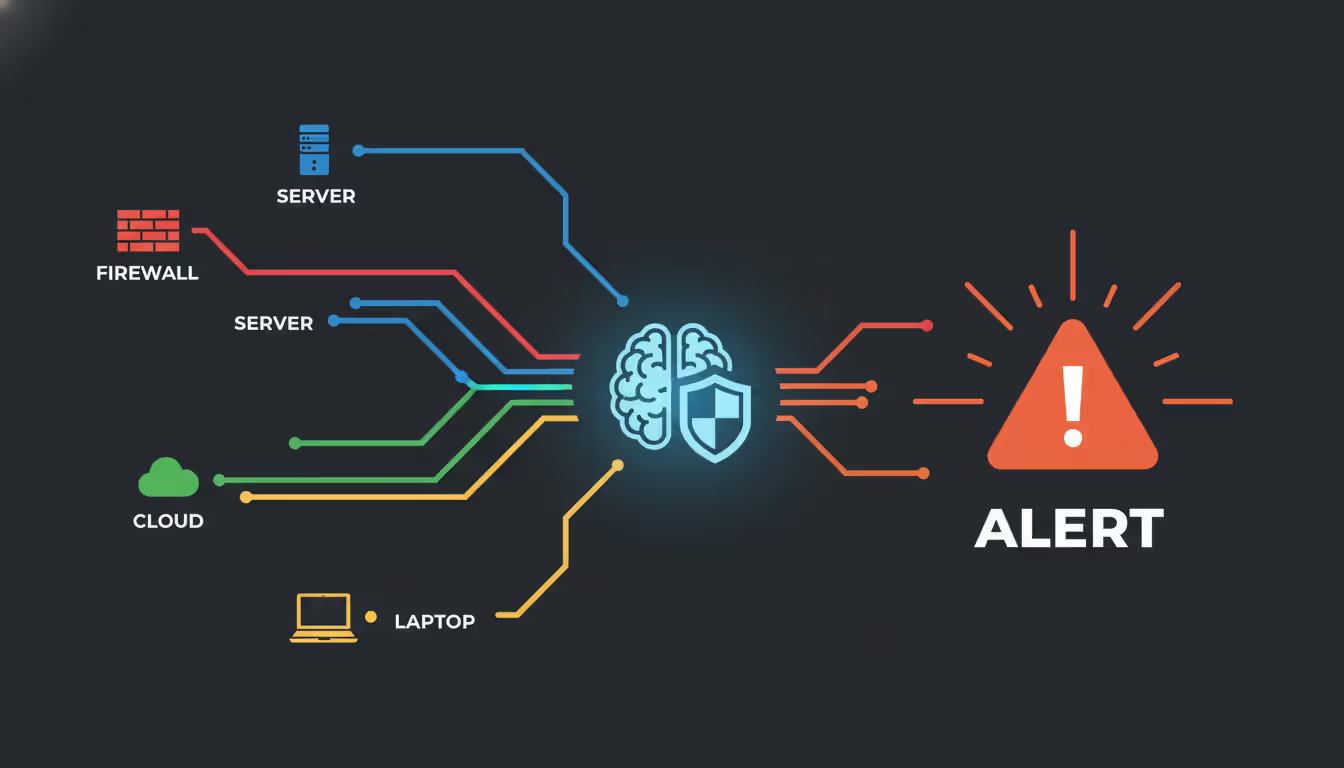
Here's what actually happens: Your SIEM pulls in security data from every corner of your network—firewalls, databases, user laptops, cloud apps, you name it. Then it analyzes everything in real time, looking for the suspicious patterns that human analysts might miss when buried under thousands of daily events.
This centralized visibility matters because modern cyberattacks rarely trigger a single obvious alarm. Instead, attackers move carefully across your network, leaving breadcrumbs scattered across different systems. A failed login here, an unusual file access there, some weird network traffic at 3 AM—individually, these events mean nothing. Your SIEM connects those dots.
The technology has come a long way from being glorified log collectors. Today's platforms use machine learning to spot anomalies you wouldn't catch with manual reviews. They automate initial responses to common threats. They help you prove compliance with regulations that demand detailed security monitoring. For any organization running a security operations center, SIEM serves as the beating heart of threat detection and response.
How Security Information and Event Management Works
SIEM operates through four distinct stages that work together continuously. Let's break down what's actually happening behind the scenes.
Data Collection starts the moment you connect a data source. Agents installed on servers, API connections to cloud platforms, syslog receivers listening for network device messages—these all funnel events into your SIEM. A mid-sized company might see 50,000 events per second during business hours. Enterprise environments? Try millions per second. Every user login, firewall block, application error, and configuration change becomes a potential piece of the security puzzle.
Normalization solves a messy problem. Your Palo Alto firewall formats logs completely differently than your Office 365 environment, which looks nothing like your Linux web servers. The SIEM takes these wildly different formats and translates them into a common language. So whether a failed login comes from Windows Active Directory or an AWS console, your system recognizes it as the same type of event. Without this translation layer, you'd be drowning in incompatible data.
Correlation is where the magic happens. The SIEM engine applies hundreds or thousands of rules simultaneously, watching for suspicious combinations. Maybe you see five failed logins from one user—probably just someone forgetting their password. But 500 failed logins across 50 different accounts, all from the same IP address in the last three minutes? That's a brute-force attack in progress. Correlation rules can detect complex attack chains: reconnaissance scanning followed by exploitation attempts, then lateral movement through your network, culminating in data exfiltration. These patterns often play out over days or weeks.
Author: Sophie Langford;
Source: musiconmainstreet.com
Alerting transforms detected threats into action. But here's the catch: if everything triggers an alert, nothing gets investigated. Analysts suffer from alert fatigue when dealing with hundreds of notifications daily. Effective it event monitoring means tuning your system so it cries wolf rarely but catches real threats consistently. Modern platforms assign risk scores to alerts, combining factors like which asset was targeted, whether the user has a history of policy violations, and whether the activity matches known attack techniques.
This entire cycle repeats continuously, processing your event stream and watching for trouble 24/7.
Core Components of a SIEM Platform
Event Log Management and Data Aggregation
Every siem platform needs robust log collection as its foundation. But "collecting logs" undersells what's really required at scale.
Data aggregation means pulling information from an astonishing variety of sources. Your traditional infrastructure—switches, routers, domain controllers, databases—definitely. But also your SaaS applications (Salesbox, Workday, GitHub), your cloud infrastructure (AWS CloudTrail logs, Azure Monitor, Google Cloud Logging), your identity systems, your endpoint protection tools, even your physical security systems if you're doing convergence right. A windows event log monitor specifically handles the quirks of Windows logging, parsing Security Event IDs like 4624 (successful login) and 4720 (user account created) that matter for security investigations.
Storage becomes a major consideration. You need hot storage for recent data—typically the last 30 to 90 days—kept in high-performance databases that let analysts run complex queries in seconds. Then you archive older data into cheaper warm and cold storage tiers. Many regulations require keeping security logs for a year or longer. Some industries demand seven years of retention. That's a lot of data when you're generating terabytes weekly.
The indexing strategy you choose dramatically affects query performance. Search for all activity from a specific user across six months of data—that query better return results in under 30 seconds, or your analysts will waste half their day waiting on the system.
Real-Time Threat Detection and Analysis
Detection separates basic log aggregation from real security event management. Your SIEM employs multiple detection techniques simultaneously:
Rule-based detection catches known attack patterns through explicit conditions. For instance: "Alert when any user accesses the HR payroll database between midnight and 5 AM on weekends." These rules are straightforward but require constant updates as attackers evolve their techniques. Many organizations start with vendor-provided rule sets, then customize based on their specific environment and threat landscape.
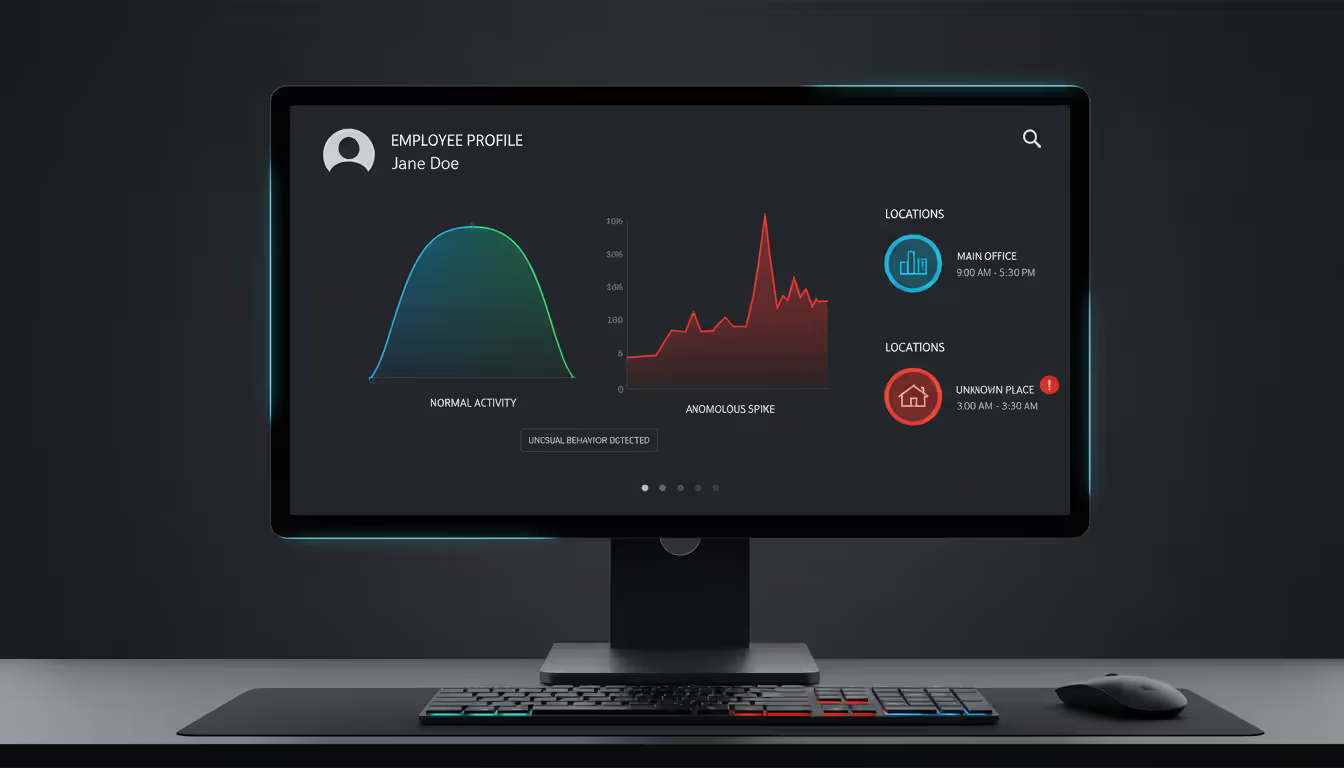
Behavioral analytics establish what "normal" looks like for each user, device, and network segment. Janet from accounting typically accesses three specific applications during East Coast business hours. When her account suddenly starts running database queries at 2 AM from an IP address in Romania, that deviation from her established pattern triggers an alert—even though no specific rule was broken. This approach catches insider threats and compromised accounts that rule-based detection misses.
Author: Sophie Langford;
Source: musiconmainstreet.com
Threat intelligence integration adds external context to your internal events. Your SIEM detects an outbound connection to IP address 192.0.2.47. Is that a legitimate business service or a command-and-control server run by a known threat actor group? Threat feeds from sources like AlienVault OTX, Recorded Future, or the FBI's InfraGard provide that context automatically.
Machine learning models have become genuinely useful (not just marketing hype) for spotting subtle attack patterns. They can identify slow-moving advanced persistent threats that deliberately stay under traditional detection thresholds. One major retailer discovered attackers had maintained access for 14 months, exfiltrating small amounts of data weekly—only machine learning flagged the pattern as anomalous.
Incident Response and Reporting
When your SIEM identifies a real threat, it needs to facilitate rapid investigation and containment.
Case management features let analysts document their investigation process—initial indicators, analysis steps taken, evidence collected, remediation actions. This creates an audit trail that's critical for post-incident reviews and legal proceedings. When you're dealing with a potential data breach, being able to reconstruct exactly what happened and when becomes absolutely essential.
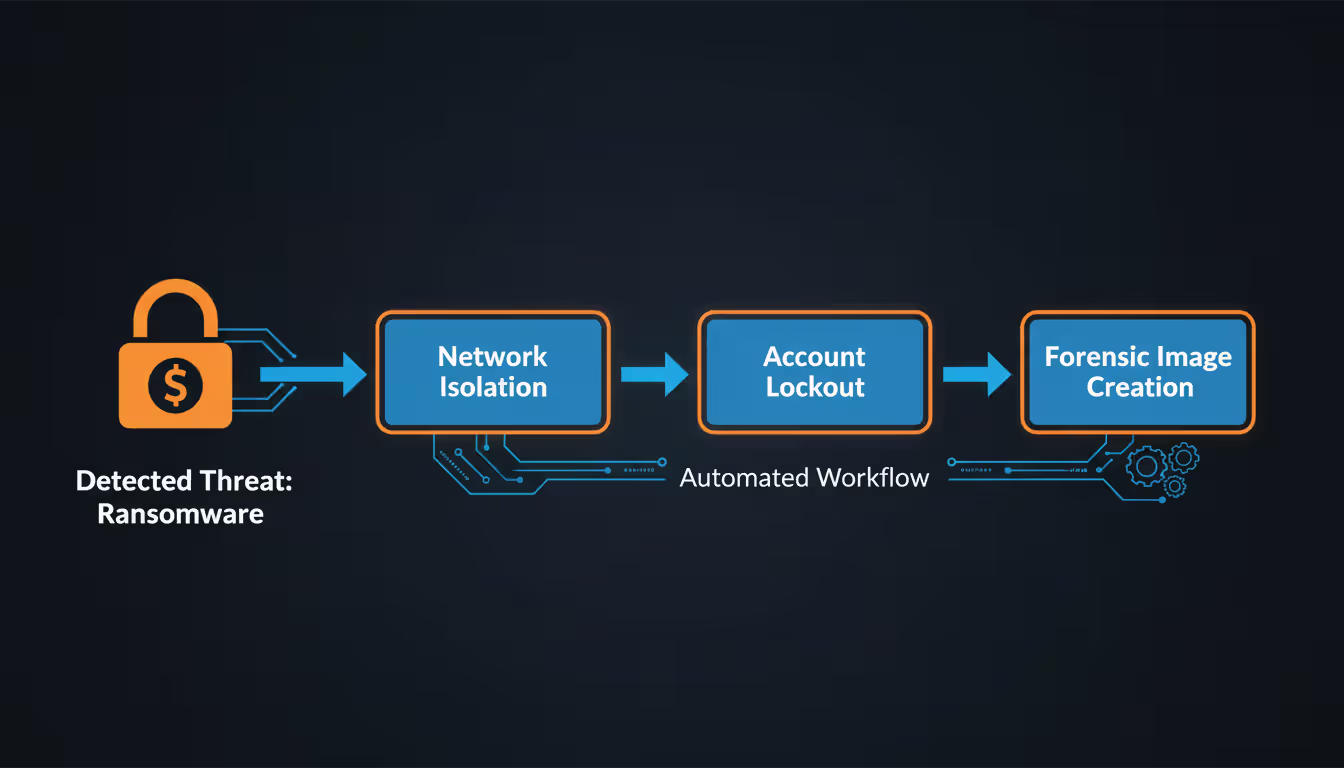
Automated playbooks execute predefined response actions without waiting for human approval. Ransomware detected on an endpoint? The playbook immediately isolates that machine from the network, disables the user's Active Directory account, and creates a forensic image for analysis—all within 60 seconds of detection. By the time an analyst reads the alert, containment has already happened.
Author: Sophie Langford;
Source: musiconmainstreet.com
Reporting serves two completely different audiences with opposing needs. Security teams want technical dashboards showing mean time to detect, alert volumes by severity, top triggered correlation rules, and investigation metrics. Meanwhile, executives and auditors need compliance reports proving you're meeting PCI DSS requirements for logging, HIPAA mandates for access tracking, or SOX controls over financial system changes. Good platforms include templates for common frameworks, turning what could be weeks of manual evidence gathering into a few clicks.
Common Use Cases for SIEM Tools
Organizations invest in siem tools for multiple reasons, often getting value from several use cases simultaneously.
Threat Detection and Response drives most initial deployments. SIEM excels at catching attacks that span multiple systems or unfold over extended periods. Consider an insider threat scenario: An employee planning to leave for a competitor starts accessing engineering documentation outside their normal role, copying files to personal cloud storage, and emailing blueprints to their personal account. Each individual action might seem innocent. The combination over two weeks screams data theft—but only centralized correlation reveals the pattern.
Compliance Monitoring and Reporting often provides the business justification for SIEM investment. Healthcare organizations must track every access to electronic health records under HIPAA. Financial institutions need detailed logs of privileged user activity for audits. Retail companies processing credit cards face PCI DSS logging requirements. Your SIEM automatically collects this evidence and generates audit-ready reports. What previously required a team scrambling for weeks before an audit now happens automatically.
Forensic Investigation depends heavily on comprehensive log data. You discover suspicious activity on a production database today. Critical questions: When did the attacker first get in? What credentials did they use? Which systems did they touch? What data got accessed or stolen? Your SIEM's historical logs and search capabilities let investigators reconstruct the complete attack timeline. In one ransomware case, forensic analysis revealed the initial phishing email compromise happened 47 days before the actual encryption—the attackers spent weeks preparing.
Vulnerability Management Integration helps prioritize remediation work. Your vulnerability scanner finds 847 vulnerabilities across your environment. Which 50 should you fix first? Cross-reference with your SIEM to see which vulnerabilities are actively being targeted. That unpatched SQL injection flaw is a critical priority if your logs show attackers have already been probing it for the last week. The equally severe vulnerability in a system nobody has tried to attack? Lower priority for immediate attention.
Operational Intelligence extends beyond pure security. IT operations teams troubleshoot application performance issues using SIEM data. Database administrators track query performance trends. Network engineers identify bandwidth hogs. This multi-department value helps justify the investment to executives who want to see ROI beyond just security benefits.
SIEM Implementation Guide for Organizations
Planning and Requirements Assessment
SIEM projects fail or succeed based on planning decisions made before you install anything.
Start by defining specific goals. "We need SIEM for security" is too vague. Better: "We need to detect lateral movement within 30 minutes, meet PCI logging requirements, and reduce incident investigation time by 50%." Clear objectives drive architectural decisions and help measure success later.
Create a comprehensive asset inventory. Which systems should feed logs into your SIEM? Many implementations underperform because critical data sources get overlooked during planning. Beyond obvious infrastructure, consider: remote office locations, cloud workloads, contractor VPN access, IoT devices, operational technology systems in manufacturing environments, SaaS applications your business depends on. Missing sources mean blind spots.
Calculate expected event volumes—then double your estimate. Organizations consistently underestimate how much log data they'll generate. A rough formula: expect 500-2,000 events per second for every 1,000 employees, depending on industry and technology maturity. Underestimating leads to performance problems or surprise licensing bills six months post-deployment.
Get stakeholder alignment before you're too far down the path. Security teams want sophisticated threat detection. Compliance officers need specific reports. IT operations wants infrastructure monitoring. Finance cares about costs. Legal has data retention concerns. Form a steering committee with representation from each group. Otherwise you'll build a system that serves one department while frustrating everyone else.
Author: Sophie Langford;
Source: musiconmainstreet.com
Deployment and Integration Steps
Your deployment sequence determines how quickly you see value from the security information and event management system.
Start with high-value data sources that deliver immediate security benefits: domain controllers (authentication events), VPN concentrators (remote access), perimeter firewalls (north-south traffic), and critical application servers. This approach generates quick wins while you work through more complex integrations. Don't try to connect everything on day one—that path leads to project delays and overwhelmed teams.
Network architecture matters more than people expect. On-premise SIEM collectors need sufficient bandwidth to receive log streams without creating bottlenecks. Placing local log collectors in remote offices lets you aggregate and compress data before transmission to the central platform, reducing bandwidth consumption by 70-80%.
Integration depth varies by data source. Simple syslog forwarding is quick to set up but provides limited context. API-based integrations take longer but deliver richer data and bidirectional communication—your SIEM can query external systems for additional context or push response actions back to source systems.
Testing discipline prevents painful discoveries later. Validate each data source individually: Are logs arriving? Is the SIEM parsing them correctly? Are all expected fields getting extracted? Many organizations skip this validation in their rush to go live, then discover months later they've been collecting malformed or incomplete data that's useless for investigations.
Tuning and Optimization
Deployment is maybe 30% of the work. Tuning transforms an expensive log collector into an effective security tool.
Alert tuning follows a systematic cycle. Track false positive rates for each correlation rule. Investigate why false positives occur—is the threshold too sensitive? Is there missing context that would distinguish legitimate activity from threats? Adjust and measure again. Expect this process to take four to six months before alert quality reaches acceptable levels. One hospital reduced their daily alerts from 1,400 to 47 through disciplined tuning, and detected two real breaches during that period that would have been buried in the previous noise.
Performance optimization keeps queries fast as data volumes grow. Create indexes on frequently searched fields. Archive old data according to defined retention policies. Review the slowest queries monthly and optimize them. Resource consumption trends reveal problems—a sudden 300% increase in storage usage probably means a new, chatty log source got added without proper filtering.
User behavior analytics models need retraining as your organization evolves. Initial baselines might flag normal business processes as anomalies because the system doesn't know what's normal yet. Seasonal patterns also matter—retail companies see very different activity during holiday shopping versus January. Quarterly reviews and model updates keep analytics aligned with business reality.
Comparing Popular SIEM Solutions
The security information and event management software landscape includes everything from enterprise platforms to specialized tools for specific scenarios.
Enterprise Platforms like Splunk Enterprise Security, IBM QRadar, and Microsoft Sentinel dominate large deployments. These handle massive scale—millions of events per second—and offer extensive integration ecosystems with hundreds of pre-built connectors. The downside? Complexity. You'll need a dedicated team to implement and operate these effectively. One Fortune 500 company reported taking 14 months to reach full operational capability with their enterprise SIEM.
Cloud-Native Solutions including Sumo Logic and Google Chronicle were built for cloud and hybrid environments from the ground up. They eliminate infrastructure management headaches—no servers to patch, no capacity planning, instant scalability. Organizations with significant cloud adoption often find these integrate more naturally than platforms originally designed for on-premise deployment then retrofitted for cloud.
Open-Source Options like Wazuh and OSSIM appeal to technically sophisticated organizations with limited budgets. You're not paying licensing fees, but you need serious expertise to deploy, customize, and maintain these platforms. Total cost of ownership can exceed commercial solutions when you factor in engineering time. One university calculated they spent $180,000 in staff time yearly maintaining their "free" SIEM—more than a commercial solution would have cost.
Managed SIEM Services from providers like Arctic Wolf and Secureworks operate the platform on your behalf, providing 24/7 monitoring and threat hunting. This model works well for organizations needing SIEM capabilities but lacking the expertise or desire to build an internal security operations center. You're essentially outsourcing your SOC function.
Here's how deployment models compare across critical factors:
Deployment Model
Cost Structure
Scalability
Maintenance Burden
Best Suited For
On-Premise
Large upfront investment; steady annual costs
Hardware limits expansion; adding capacity is expensive
Requires full-time staff for updates, patching, hardware
Regulated sectors with data residency mandates; companies with existing datacenter investments
Fast-growing companies; cloud-first organizations; businesses without datacenter infrastructure
Hybrid
Combined capital and operational spending
Scale different pieces independently
Moderate; maintaining some on-premise components
Firms transitioning to cloud; compliance needs for specific data types
Security Information and Event Management Market Trends
The security information and event management market keeps expanding as threats multiply and regulations tighten. Current projections put the market above $8 billion by 2028, growing roughly 10-12% annually.
Cloud Adoption Acceleration marks the biggest architectural shift we're seeing. In 2020, most SIEM deployments ran on-premise. By 2025, cloud and hybrid models dominate new purchases, especially among mid-market companies. Cloud platforms eliminate the headache of hardware management and offer consumption-based pricing where you pay for what you actually use instead of over-provisioning for peak capacity.
AI and Machine Learning Integration has graduated from experimental features to critical capabilities. Today's platforms use AI to reduce false positives through smarter anomaly detection, automate tier-1 analyst work like initial alert triage, and predict which vulnerabilities in your environment are most likely to be exploited based on threat actor patterns. Some vendors now incorporate generative AI to help analysts write complex queries in natural language or interpret unfamiliar log formats automatically.
Extended Detection and Response (XDR) Convergence blurs traditional product boundaries. Vendors are merging SIEM capabilities with endpoint detection, network traffic analysis, and cloud security into unified platforms. The promise: better threat visibility across all layers and coordinated response. The concern: vendor lock-in becomes more severe when you've consolidated so many functions with one provider.
Compliance Automation capabilities expand as regulatory landscapes grow more complex. GDPR, CCPA, and emerging privacy regulations require detailed logging and reporting that SIEM platforms uniquely provide. Automated compliance monitoring cuts audit preparation from weeks to hours. One financial services company reduced their SOX audit prep time from 240 person-hours to 12 using automated SIEM reporting.
Skills Shortage Impact drives vendors toward increased automation and simpler operations. The cybersecurity workforce gap continues widening—hundreds of thousands of open positions globally with not enough qualified candidates. SIEM vendors respond by building platforms that require less specialized expertise through better automation, clearer workflows, and AI-assisted analysis.
SIEM remains essential for security operations, but platforms today look nothing like the log management tools from ten years ago. When evaluating vendors, prioritize their automation capabilities and AI maturity over simple feature checklists
— Allie Mellen
Frequently Asked Questions About SIEM
What separates SIEM from basic log management?
Log management collects and stores logs so you can search them later for troubleshooting or compliance purposes. SIEM builds on that foundation by adding real-time analysis, correlation across data sources, and active threat detection. You'd use log management to figure out why your email server crashed last Tuesday. You'd use SIEM to discover someone is actively trying to compromise that email server right now. The distinction: passive storage versus active security monitoring.
What should I budget for a SIEM system?
Pricing varies wildly depending on your deployment choice, data volumes, and required capabilities. Small businesses using cloud-based solutions might spend $10,000-$30,000 yearly for basic coverage. Mid-market deployments typically run $50,000-$150,000 annually. Enterprise implementations commonly exceed $200,000-$500,000 per year when you include licensing, infrastructure, and staffing. Pricing models differ: some vendors charge per device monitored, others per gigabyte ingested, still others per user. Calculate total cost of ownership—software licenses represent maybe 30-40% of true costs, with personnel, training, and integration making up the rest.
Should smaller companies invest in SIEM tools?
Small businesses face identical threats to enterprises—ransomware doesn't check company size before encrypting files. But traditional SIEM implementations demand resources most small companies lack. Managed SIEM services or simplified cloud platforms designed for smaller organizations provide essential protection without requiring dedicated security staff. If you handle customer data, process credit cards, or operate in a regulated industry, SIEM capabilities are increasingly non-negotiable regardless of organization size. Start with basic threat detection and compliance reporting, then expand as budget allows.
Which skills do SIEM administrators need?
Managing a SIEM platform effectively demands diverse technical knowledge. Administrators need solid networking fundamentals, familiarity with both Windows and Linux operating systems, understanding of log formats and protocols, and knowledge of your organization's application landscape. Security analysts require different skills: recognizing attack patterns, understanding threat actor tactics and techniques, conducting forensic investigations, and writing complex queries in platform-specific languages (SPL for Splunk, KQL for Microsoft Sentinel). Finding individuals with this complete skill set is challenging—cross-training IT staff and partnering with managed service providers are common workarounds.
How long does implementing SIEM actually take?
Timelines range from 8-12 weeks for straightforward cloud deployments in small environments to 12-18 months for complex enterprise rollouts. The technical platform installation might complete in days, but achieving genuine security value requires integrating data sources, developing correlation rules, and extensive tuning. A realistic timeline for mid-sized organizations includes 4-6 weeks planning and design, 6-8 weeks deployment and initial integration, then 3-6 months tuning and optimization before the SIEM delivers consistent value. Organizations that shortchange the tuning phase end up with expensive tools that generate more noise than insight.
Will SIEM prevent attacks from succeeding?
SIEM primarily detects attacks and enables fast response rather than preventing initial compromise. However, when integrated with security orchestration, automation, and response (SOAR) platforms, your SIEM can trigger automated preventive actions—blocking malicious IP addresses, disabling compromised accounts, isolating infected systems. The real value lies in dramatically compressing the time between initial compromise and detection. Attackers who remain undetected for months cause catastrophic damage. SIEM helps you detect and contain breaches in hours or days instead, limiting the damage they can inflict.
Security information and event management has transformed from a compliance checkbox into a critical operational necessity for organizations navigating today's threat landscape. Modern platforms deliver unprecedented visibility across hybrid and multi-cloud environments, while AI-driven analytics help security teams focus on genuine threats instead of drowning in false alarms.
Success requires more than purchasing the right software. You need proper planning, commitment to ongoing tuning and optimization, and the analytical skills to transform raw data into security intelligence. Organizations that treat SIEM as a continuous improvement journey—constantly refining detection rules, expanding data sources, adapting to emerging threats—gain sustainable security advantages over those expecting plug-and-play solutions.
The convergence of SIEM with extended detection and response capabilities, combined with increasing automation and cloud adoption, is making sophisticated threat detection accessible to organizations that previously couldn't justify building security operations centers. Whether you're evaluating your first SIEM platform or optimizing an existing deployment, focus on measurable outcomes: faster threat detection, more efficient investigations, demonstrable risk reduction.
The technology will keep evolving, but the fundamental need remains constant—you can't protect what you can't see, and SIEM gives you those eyes across your environment.
Event tracking software captures attendee behavior and event performance metrics throughout the entire event lifecycle. This guide covers how these platforms work, key features to prioritize, common selection mistakes, and how to measure event success with data-driven insights
Setting up a smooth registration system can mean the difference between a packed venue and empty seats. This comprehensive guide walks through everything you need to build an event registration process that converts interest into confirmed attendance, from choosing the right platform to avoiding common mistakes
Event marketing tools handle promotion, analytics, and automation for modern events. Learn which platforms streamline workflows, track ROI, and boost attendance—from email marketing and social media to paid ads and attribution modeling
Event marketing platforms centralize campaign creation, multichannel distribution, and analytics. This guide covers core features, platform types, selection criteria, common mistakes, and ROI measurement to help you choose the right solution for your events
The content on this website is provided for general informational and educational purposes only. It is intended to explain concepts related to event management software, ticketing systems, hybrid event platforms, and operational tools for event organisers.
All information on this website, including articles, guides, and examples, is presented for general educational purposes. Outcomes may vary depending on event size, technology choices, and organisational needs.
This website does not provide professional legal, financial, or software advice, and the information presented should not be used as a substitute for consultation with qualified event tech or IT professionals.
The website and its authors are not responsible for any errors or omissions, or for any outcomes resulting from decisions made based on the information provided on this website.