Digital command center dashboard displaying automated ticketing system interface with color-coded ticket cards, routing arrows, and notification icons on a dark blue gradient background
Think about the last time your team handled support requests through email. Someone sends a message, it gets forwarded a few times, maybe lost in someone's inbox, and three days later you're wondering if anyone actually responded. That's the chaos that automated ticketing systems eliminate.
These platforms work like a digital command center for every request that comes into your organization. Someone reports a broken laptop? The system logs it immediately, stamps it with a tracking number, figures out which technician should handle it based on their skills and current workload, and keeps everyone updated until it's fixed. No requests disappear into email black holes. No confusion about who's responsible. Everything's tracked, measured, and visible.
What makes modern auto ticketing software interesting isn't just the organizational benefits—it's how smart these systems have become. The best platforms now use machine learning to read incoming requests and predict what type of issue it is before anyone looks at it. Some can even solve common problems automatically. Employee forgot their password? The system sends a reset link without bothering IT. That's the evolution from basic tracking tools to intelligent assistants that actually reduce workload.
What Is an Automated Ticketing System
At its most basic level, an automated ticketing system converts every service request into a structured digital record. Each ticket captures who needs help, what they need, when they asked for it, and tracks the entire resolution journey from start to finish.
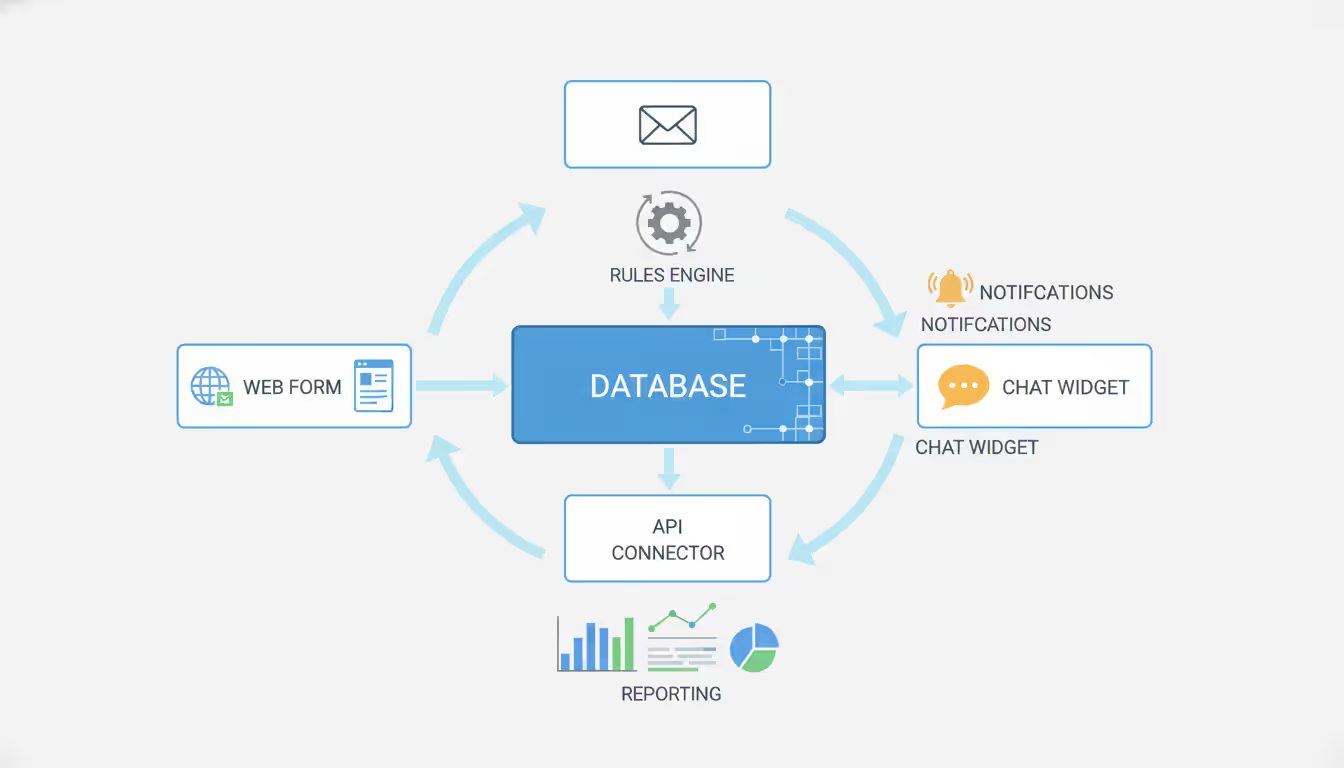
Let's break down what's actually happening under the hood. You've got an intake layer where requests enter the system—could be a web form, an email address that auto-converts messages to tickets, a chat widget, or a direct API connection from another application. All that information flows into a central database that stores everything: current tickets, historical tickets, who worked on what, how long things took.
Here's where automation kicks in: a rules engine constantly evaluates incoming tickets and makes decisions. See the word "urgent" in the subject line? Bump the priority. Ticket coming from the CEO's office? Route it to senior staff. Network issue reported from your Atlanta location? Assign it to the Atlanta infrastructure team. These decisions happen in seconds, not hours.
Author: Liam Crestwood;
Source: musiconmainstreet.com
The notification layer makes sure the right people know about tickets without anyone needing to constantly check a queue. Agent gets assigned a ticket? They receive an alert. Ticket sits untouched for 30 minutes? The supervisor gets notified. Customer submits a ticket? They get an automatic confirmation with a tracking number.
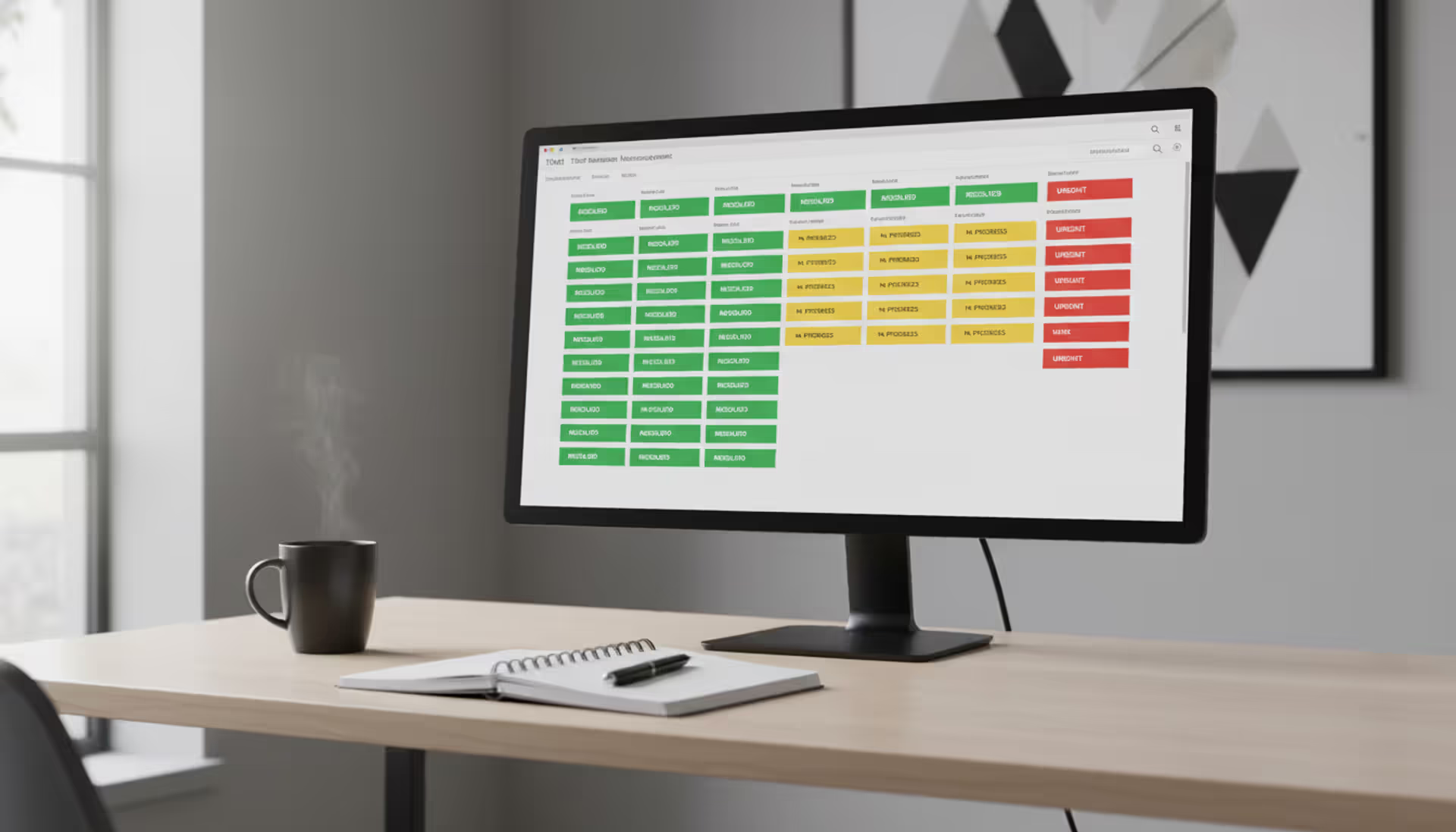
Finally, you've got reporting that aggregates all this activity into dashboards showing you exactly what's happening: how many tickets are open right now, which types of issues are most common, who's overloaded, where the bottlenecks are.
Compare this to manual handling, where someone acts as a human router. They read each incoming request, decide where it belongs, forward it to someone, then somehow remember to follow up later. Manual systems depend entirely on individuals remembering things and making consistent decisions. One person might think an issue is urgent while another calls it routine. Automated systems apply the same logic every single time—a printer issue from accounting always follows the same path whether it arrives Monday morning or Friday afternoon.
How Automated Ticketing Systems Work
Every ticket follows a lifecycle that automation manages from beginning to end. Here's how that actually plays out in practice.
Ticket Creation and Categorization
The moment a request hits the system, data collection begins automatically. The platform grabs everything it can: what time is it, who submitted this, what device are they using, which application version, their location if relevant. Users don't fill out tedious forms asking for details the system already knows.
Categorization happens through pattern recognition. The system scans what users wrote looking for telltale phrases. "Can't access shared drive" triggers a file server category. "Getting error code 404" points to a web application issue. AI ticketing system platforms take this further by understanding intent even when people describe problems differently. Whether someone says "the app crashed," "the program won't open," or "I keep getting kicked out," the system recognizes these as the same category of application failure.
Some organizations use structured intake forms with dropdown menus where users select categories themselves, but let's be honest—most users don't know the difference between "authentication failure" and "authorization issue." They just know they can't get into the system. Smart implementations let people describe the problem naturally, then the system suggests categories while allowing manual override if the guess is wrong.
Priority calculation considers multiple factors simultaneously. Sure, anything from executives might get flagged high priority, but sophisticated ticketing automation looks deeper: How many people does this affect? Is this person completely blocked from working or just inconvenienced? Does this involve a system with strict service guarantees? The system weighs these factors mathematically rather than trusting users to rate their own urgency—because let's face it, everyone thinks their issue is critical.
Assignment and Routing Logic
Getting tickets to the right person sounds simple but gets complicated fast. Basic round-robin assignment just cycles through available agents, which seems fair until you realize it ignores completely different skill levels and current workloads. Your database expert might have two tickets while a junior agent struggling with five complex issues gets assigned another.
Skills-based routing maintains detailed profiles for each team member. Database administration, network troubleshooting, application support, hardware repair—the system knows who does what well. When a SQL Server ticket arrives, it queries which agents have that skill, checks who's currently working, looks at their current ticket load, maybe even considers their historical resolution time for similar issues, then makes an assignment.
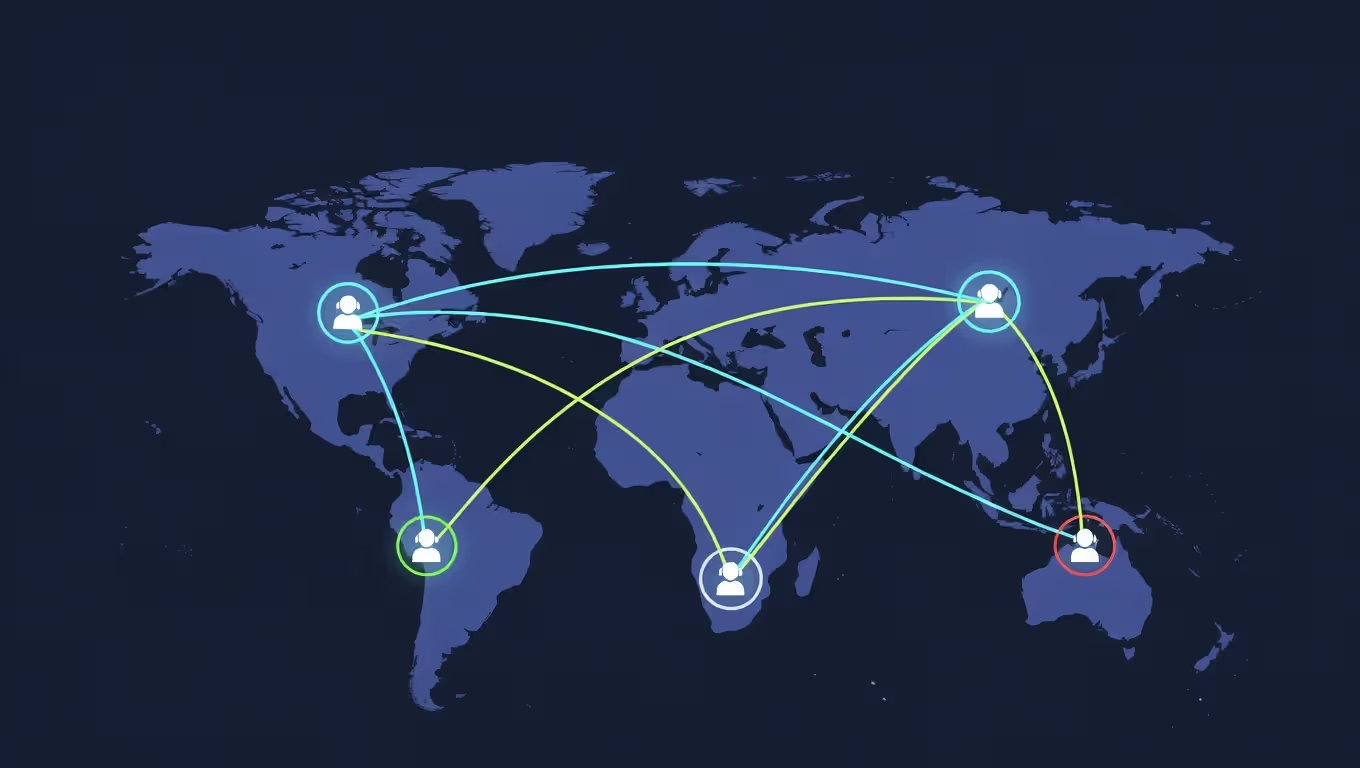
Geography matters more than people initially realize. Your Tokyo office submits a ticket at 2 PM local time—that's midnight in New York. A purely skills-based system might assign it to your best network specialist who happens to be asleep. Location-aware routing checks time zones and shift schedules before assignment.
Author: Liam Crestwood;
Source: musiconmainstreet.com
Escalation rules define what happens when tickets stagnate. A high-priority ticket with no response after 20 minutes? Escalate to the team lead. Critical infrastructure issue not acknowledged in 10 minutes? Page the on-call manager. Escalation doesn't always mean reassigning the ticket—sometimes it just adds supervisors as watchers who get copied on updates and can intervene if needed.
Some automated support ticketing platforms use pool-based assignment where tickets go to a team rather than an individual. Anyone on that team can claim it. This works great for teams with overlapping skills but requires cultural accountability—otherwise tickets sit unclaimed while everyone assumes someone else will grab it.
Resolution and Closure Processes
Resolution workflows range from fully automated to highly collaborative depending on complexity. Simple, repetitive requests get handled without human involvement. Password reset tickets? The system generates a secure link, emails it to the user, confirms when they used it, then closes the ticket automatically. These zero-touch resolutions handle high-volume, low-complexity work that would otherwise consume agent time.
For tickets needing human expertise, every interaction gets logged. Agent notes, status updates, back-and-forth with the requester, time spent working—the system captures it all. This audit trail proves invaluable during post-mortems when someone asks "why did this take three days to fix?"
Closure methodology varies. Some systems auto-close tickets if users don't respond within a certain timeframe after receiving a solution—say, three days of silence means the problem must be fixed. Others require explicit user confirmation: "Did this solve your problem? Yes or No." There's a tension here between clean metrics (getting tickets closed) and genuine customer satisfaction (making absolutely sure problems are actually resolved).
After closure, resolved tickets become learning opportunities. If a dozen people submit similar tickets and an agent discovers a fix, that solution needs documentation. Smart ticketing system platforms identify these patterns and suggest knowledge base articles, sometimes even drafting them automatically based on what the agent did to solve the issue.
Types of Automated Ticketing Solutions
Ticketing systems serve dramatically different purposes depending on what you're actually trying to manage.
IT and Helpdesk Ticketing Platforms
Automated IT ticketing supports employees dealing with technical problems. These platforms hook into your entire IT infrastructure—monitoring tools, asset databases, configuration management, identity systems—pulling context from everywhere.
Real-world example: an employee's laptop starts making grinding noises and overheating. They submit a ticket saying "laptop acting weird." The system checks the asset database, sees it's a ThinkPad from 2020 with previous tickets about battery issues and fan problems, notes it's out of warranty, and automatically creates a linked procurement ticket for a replacement. The IT team sees the full device history without asking a single follow-up question.
AI helpdesk ticketing capabilities include proactive issue detection. Your monitoring tools show server disk space at 87% capacity? The system creates a ticket for cleanup before users notice slowdowns. This shifts IT from reactive firefighting (responding to complaints) to preventive maintenance (fixing things before they break).
Integration with HR systems enables automated provisioning workflows. New employee starting Monday? The ticketing platform automatically generates tickets for laptop preparation, account creation, email setup, and access provisioning—all assigned to appropriate teams with due dates tied to the start date.
Event Ticketing Automation
Event ticketing automation solves a completely different problem: selling access to concerts, conferences, sports events, or attractions. The focus shifts from problem resolution to transaction processing at massive scale.
These systems handle sudden, extreme load. When Taylor Swift tour dates go on sale, you might see 100,000 people trying to buy simultaneously. The platform manages real-time inventory (preventing double-selling of the same seat), processes payments, detects fraud attempts, and delivers digital tickets instantly—all while handling this enormous surge.
Fraud prevention becomes critical at this scale. Automated systems watch for suspicious patterns: same credit card used for 20 purchases, bot activity trying to scalp tickets, VPN-masked IP addresses, purchasing velocity that's impossibly fast for human behavior. Machine learning models flag anomalies for review before completing transactions.
Access control integration means tickets validate at entry. QR codes get scanned at the gate, the system verifies authenticity in milliseconds, confirms this specific ticket hasn't been used already, and grants entry. For major events with 50,000 attendees, this needs to happen reliably and fast.
Dynamic pricing adjusts ticket costs continuously based on demand, remaining inventory, time until the event, and competitive pricing. This revenue optimization happens automatically without anyone manually updating prices.
Customer Support Ticketing
Customer support ticketing manages inquiries from external customers—complaints, questions, requests. Unlike IT helpdesk focused on employees, these platforms prioritize customer experience and integrate tightly with CRM and e-commerce systems.
Omnichannel support proves essential here. Your customer starts a conversation on Twitter complaining about a delayed order, follows up via email with their order number, then calls to escalate. The ticketing system unifies these three interactions into one continuous thread. When the phone agent answers, they see the Twitter complaint and email exchange without the customer repeating everything.
Sentiment analysis in AI ticketing system implementations monitors emotional tone throughout conversations. Customer language becomes increasingly frustrated? The system might auto-escalate to a senior agent or suggest empathy-focused responses. This emotional intelligence layer helps prevent minor issues from becoming viral social media complaints.
Self-service deflection aims to resolve issues without creating tickets at all. Chatbots answer common questions, knowledge bases provide troubleshooting steps, and only when these fail does a ticket get created. This reduces agent workload while giving customers instant answers at 2 AM when nobody's available.
SLA management gets complex because different customers have different agreements. Enterprise clients might have 30-minute response guarantees while free-tier users have 48-hour SLAs. The system tracks these commitments per customer and alerts agents when deadlines approach.
Author: Liam Crestwood;
Source: musiconmainstreet.com
Key Features to Look for in Ticketing Automation Software
Choosing the right platform means evaluating capabilities against your actual needs, not just checking feature boxes on comparison charts.
Multi-channel intake ensures users submit tickets however they prefer. Email, web portal, mobile app, chat, phone calls (with automatic transcription to tickets), SMS, even API submissions from other systems. The platform normalizes these different formats into consistent ticket records.
Intelligent routing goes beyond simple round-robin assignment. Look for context-aware logic considering skills, current workload, availability, time zones, and historical performance. Bonus points if the system learns from outcomes—if Agent A consistently resolves database tickets faster than Agent B, future database tickets should prefer Agent A.
Automation rules and workflows need a visual builder that doesn't require coding. Your team lead should be able to create complex logic: "If ticket category is security AND priority is high AND it's outside business hours, then page the security team lead and notify the CIO." Writing this as code is painful; dragging workflow boxes should be simple.
Integration capabilities determine whether the platform plays nicely with your existing tools. Pre-built connectors for Active Directory, Slack, Teams, Salesforce, and major monitoring tools save weeks of custom development. API documentation matters when you need custom integrations—some vendors have terrible APIs that make even simple connections frustrating.
Reporting and analytics should show real-time dashboards (what's happening right now) and historical analysis (what patterns exist over time). You want answers to questions like: Do tickets spike on Mondays? Which issue types take longest to resolve? Are certain teams consistently missing SLAs? Which agents close tickets fastest versus which ones have the highest customer satisfaction?
Knowledge base integration puts solutions at agents' fingertips. As they work a ticket, the system suggests relevant articles based on keywords and past resolutions. Creating new articles from solved tickets should take seconds, not require a separate authoring tool.
SLA tracking and alerting monitors service commitments automatically. Define response and resolution timeframes, then let the system alert agents when deadlines approach and escalate when violations occur.
Mobile access needs to be full-featured, not a crippled read-only view. Agents working from home or on-site should update tickets, add notes, change assignments, and close issues from their phones.
Customization flexibility matters because every organization works differently. You'll need custom fields (project code, cost center, device serial number), custom statuses (awaiting parts, vendor escalated), custom workflows that match your processes. This customization shouldn't require vendor professional services charging $200/hour.
AI and machine learning capabilities include predictive categorization (guessing the category before anyone reads the ticket), sentiment analysis (detecting frustrated customers), automated response suggestions (AI drafts replies agents can edit), and anomaly detection (identifying unusual patterns like sudden ticket spikes that might indicate system-wide issues).
Asset and configuration management links tickets to specific infrastructure. When a server fails, you want to see all tickets related to that server, understand which services depend on it, and know who's been working on it recently.
Benefits of Implementing Ticketing Automation
Organizations deploy ticketing automation to solve immediate pain points, but the long-term value often exceeds initial expectations.
Response time improvement shows up immediately. Automated routing eliminates the queue where tickets wait for manual distribution. Instead of hours sitting unassigned, tickets reach the right resolver in seconds. Companies routinely see first response times drop from four hours to fifteen minutes.
Consistency in service delivery replaces the wild variability of manual processes. Every ticket follows identical workflows, receives the same prioritization logic, gets tracked with uniform metrics. Customer experience becomes predictable—they receive similar service regardless of which agent handles their ticket or when they submit it.
Workload visibility transforms management from guesswork to data. Before automation, understanding team capacity meant asking "how busy are you?" and getting unhelpful responses like "pretty busy." With automated support ticketing, dashboards show exactly how many open tickets each person has, average age of their queue, resolution velocity. This enables intelligent resource allocation instead of just assigning work to whoever complains least.
Cost reduction accumulates from multiple sources. Agents handle 30-40% more tickets through elimination of manual routing, searching for information, and duplicate data entry. Self-service resolution deflects 15-25% of tickets entirely. Better routing reduces reassignments that waste effort. First-year productivity gains of 25-35% are common.
Customer satisfaction improves measurably when response times shrink and first-contact resolution increases. Customers appreciate status transparency—they can check ticket progress anytime instead of calling to ask "did you forget about me?" Automated updates notify them of progress, reducing the anxiety of wondering whether their issue fell through the cracks.
Compliance and audit trails become automatic byproducts. Every action gets timestamped and attributed to specific users. When auditors ask who modified that configuration or how you handled a security incident, the ticket history provides complete documentation. This proves particularly valuable in healthcare (HIPAA audits), finance (SOX compliance), or any regulated industry.
Knowledge retention no longer depends on individual employees. When your star technician who's been there for 10 years finally retires, their problem-solving approaches remain accessible in ticket archives and knowledge articles. Institutional knowledge becomes systematized instead of walking out the door.
Predictive capabilities emerge once you've accumulated sufficient historical data. Machine learning identifies patterns humans miss: Server X tends to fail on Sunday mornings. Application Y confuses new users within their first week. Team Z consistently resolves database issues 40% faster than team average. These insights enable proactive measures that prevent tickets from being created in the first place.
Author: Liam Crestwood;
Source: musiconmainstreet.com
How to Choose the Right Automated Support Ticketing Solution
Selection methodology matters as much as the features you're evaluating. A systematic approach prevents expensive mistakes that take years to undo.
Start with use case clarity. Supporting internal employees requires different capabilities than supporting external customers. IT issues need different workflows than customer service inquiries or facilities requests. An IT-focused platform might lack CRM integration that customer support teams need. A customer support platform might not integrate with network monitoring tools. Define your primary use case clearly before looking at products.
Assess scale requirements honestly. Handling 50 tickets weekly needs different infrastructure than handling 500 daily. Pricing models and performance vary dramatically based on volume. A platform perfect for small scale might collapse under enterprise load. Conversely, enterprise platforms often have minimum commitments (100+ agents) that make them prohibitively expensive for small teams. Match platform scale to your current reality and two-year growth projection.
Evaluate integration needs by listing every system the platform must connect with: authentication directories, communication tools, monitoring systems, CRM platforms, asset databases, ERP systems. Verify native integrations exist or API documentation supports necessary data exchange. Custom integration development costs $10,000-50,000 per integration and creates ongoing maintenance burden.
Consider implementation complexity realistically. Some platforms work within days with minimal configuration. Others require months of customization, workflow design, data migration, and testing. Match implementation approach to your team's technical capabilities and available time. If you need operational capability in weeks, eliminate platforms requiring six-month implementations.
Test with real scenarios during evaluation. Don't just watch vendor demos where everything works perfectly. Submit actual tickets from your environment, configure a real workflow, try to run reports you'd actually use. Include end users in testing—a platform intuitive to IT staff might confuse the employees who'll submit tickets.
Review total cost of ownership beyond subscription fees. Include implementation costs (consulting, migration, training), integration development, ongoing administration time, and annual price increases. A platform with low subscription pricing might cost more overall if it requires dedicated administrator time or expensive professional services for every change.
Check vendor stability and roadmap before committing. Is the vendor financially stable or a startup that might get acquired and discontinued? How frequently do they release updates? Is the platform moving toward modern architecture (cloud-native, API-first) or maintaining legacy technology? You're potentially committing for 5+ years—the vendor needs to exist and innovate that long.
Examine support and community resources available. When problems occur at 9 PM Friday, how quickly will the vendor respond? Is there an active user community sharing tips? Are learning resources and documentation comprehensive? Platforms with strong communities often provide more value than those dependent solely on vendor support.
Consider compliance requirements if you operate in regulated industries. Verify the platform meets necessary standards: data residency requirements (EU data stays in EU), encryption standards, audit capabilities, access controls. Retrofitting compliance into non-compliant platforms is extremely difficult.
Common Implementation Challenges and How to Avoid Them
Even well-planned implementations hit obstacles. Anticipating common issues enables proactive mitigation instead of reactive firefighting.
Data migration complexity almost always exceeds initial estimates. Existing tickets, user records, historical data—all must transfer to the new system. Data formats never align perfectly, requiring transformation scripts. Legacy data has inconsistencies: missing required fields, invalid categories, orphaned records. Start cleanup early, weeks before migration. Export sample data and attempt trial imports to identify issues. Plan for manual correction of problematic records rather than assuming 100% automated migration success.
User adoption resistance emerges when people prefer familiar tools even if inefficient. Agents might continue using email or spreadsheets alongside the new system, completely defeating the purpose. Combat this through early involvement—include end users in selection decisions and workflow design. Provide hands-on training, not just documentation PDFs. Identify champions within teams who embrace the system and can mentor hesitant peers. Most critically, disable old methods once the new system launches. Allowing parallel systems guarantees some users never switch.
Over-customization is incredibly tempting but dangerous. Platforms offer extensive customization options, and stakeholders want workflows matching existing processes exactly. However, excessive customization creates complexity that's difficult to maintain, impossible to upgrade, and confusing to new users. Challenge whether custom workflows are truly necessary or if standard processes would work fine. Implement core functionality first, operate for several weeks, then add customizations based on actual pain points rather than theoretical needs.
Integration failures often surface late in implementation when systems finally connect with real data. APIs might not support required data exchange, or performance degrades when realistic volumes flow through integrations. Test integrations early with production-scale data volumes. Build error handling and monitoring into every integration so failures get detected and alerted immediately rather than silently breaking.
Insufficient workflow planning leads to tickets getting stuck in weird states or routed incorrectly. Map workflows exhaustively before configuration: What are all possible ticket paths? What triggers escalations? Who gets notified at each stage? Document edge cases: What happens if the assigned agent is on vacation? How do you handle tickets that don't fit any category? Test workflows thoroughly with realistic scenarios before go-live.
Inadequate training causes more implementation failures than any technical issue. Users receive a rushed one-hour session covering basic features, then struggle with real scenarios. Provide role-specific training: end users learn ticket submission and tracking; agents learn resolution workflows and knowledge base usage; administrators learn configuration and reporting. Create searchable reference materials and offer ongoing training sessions after launch, not just pre-launch.
Metrics misalignment occurs when tracked metrics don't align with actual goals. Measuring "tickets closed per day" incentivizes agents to close tickets quickly rather than thoroughly. Measuring "average resolution time" discourages agents from accepting complex tickets that hurt their averages. Define metrics carefully considering potential gaming behaviors. Balance efficiency metrics (speed, volume) with quality metrics (customer satisfaction, first-contact resolution, reopened ticket rate).
Vendor-specific challenges require understanding each vendor's ecosystem. IBM event automation implementations integrate tightly with other IBM tools, providing value if you're already in that ecosystem but creating friction if you're not. Evaluate whether vendor-specific features create lock-in or whether you can migrate to alternatives later if needed.
Most organizations dramatically underestimate the compound benefits of ticketing automation.You'll see immediate gains—faster response times, better routing efficiency—measurable within your first few weeks. But the truly transformational value emerges over months as your data accumulates. Suddenly you understand which issues consume the most time, which products generate the heaviest support burden, and which processes desperately need redesign. That strategic insight often delivers more long-term value than the operational efficiency you implemented it for. We've tracked organizations that cut support costs 35% in year one, then leveraged the data insights to redesign their customer onboarding process and reduce overall ticket volume another 20% in year two. These platforms generate ROI repeatedly through multiple mechanisms
— Jennifer Martinez
Frequently Asked Questions
What separates automated ticketing systems from manual approaches?
Manual ticketing depends on humans making decisions at every step. Someone reads incoming requests, categorizes them, decides priority, assigns them to team members, then tracks progress through spreadsheets or email chains. Automated platforms execute these steps using predefined rules. When requests arrive, software immediately categorizes them, calculates priority, routes them to appropriate agents based on skills and availability, then monitors progress against service commitments. The core difference is speed, consistency, and scalability—automated systems handle 10 tickets or 1,000 tickets with identical accuracy and speed, while manual systems slow down and introduce errors as volume climbs.
Do AI ticketing systems connect with other helpdesk tools we already use?
Most modern AI ticketing platforms are built integration-first with extensive connectivity options. You'll typically find pre-built connectors for common helpdesk tools, IT service management platforms, CRM systems, communication tools like Slack and Microsoft Teams, and monitoring solutions. Integration usually happens through REST APIs enabling bidirectional data flow. A ticket created in your AI system might automatically generate a corresponding record in your ITSM platform, or infrastructure monitoring alerts might spawn tickets automatically. Verify during evaluation that your specific integrations either exist as native connectors or are feasible through documented APIs. Some platforms also support webhook-based integrations for real-time event triggering between systems.
What does automated ticketing software actually cost?
Pricing varies enormously based on scale and feature set. Entry-level solutions for small businesses start around $10-30 per agent monthly for basic ticketing. Mid-market platforms with AI capabilities, advanced automation, and robust integrations typically run $50-150 per agent per month. Enterprise platforms with extensive customization, dedicated support, and compliance features can exceed $200 per agent monthly. Some vendors price by ticket volume instead of agent count, with tiers like $500 monthly for up to 1,000 tickets. Don't forget implementation costs beyond subscriptions: simple cloud deployments might need just a few thousand for configuration and training, while complex enterprise implementations can cost $50,000-200,000 for consulting, customization, integration development, and data migration. Calculate three-year total ownership cost including subscription, implementation, training, and ongoing administration when comparing options.
Can small businesses benefit from ticketing automation?
Absolutely—ticketing automation delivers value at any scale, though the right platform differs for small businesses. Companies with 5-20 employees handling 50-200 monthly tickets don't need enterprise platforms with complex workflow engines. Look instead for user-friendly systems with quick setup, minimal configuration, and straightforward pricing. The value for smaller teams comes from ensuring nothing gets lost, providing customers status visibility, and creating documentation of recurring issues and their solutions. Even basic automation—tickets auto-created from emails, simple assignment rules, status tracking—eliminates the chaos of managing requests through personal inboxes. Many small businesses discover that ticketing automation lets them scale up without proportionally increasing support headcount, because efficiency gains from automation offset volume increases.
Which industries see the biggest advantages from automated support ticketing?
Any industry handling repetitive service requests benefits, but several see exceptional value. Technology companies use IT helpdesk automation to support both employees and customers, often managing thousands of technical support tickets daily. Healthcare organizations handle patient inquiries, equipment maintenance, and IT support through automated ticketing, with compliance requirements making detailed audit trails essential. Financial services firms use ticketing for customer service, fraud investigations, and internal IT support, with CRM integration providing crucial customer context. Education institutions manage student support, IT services, and facilities requests through automated systems that handle massive seasonal volume spikes around registration and semester starts. Retail companies use ticketing for customer service, returns processing, and store support. Manufacturing operations track equipment maintenance, quality issues, and supply chain problems through ticketing integrated with ERP platforms. The common thread is high request volume, need for accountability, and value from data-driven insights into operational patterns.
What's a realistic implementation timeline for automated ticketing?
Implementation timelines range from one week to six months depending on complexity and scope. Small teams deploying cloud-based platforms with minimal customization might be operational within one to two weeks: a few days for initial configuration, several days testing and training, then go-live. Mid-sized implementations with custom workflows, integrations, and data migration typically need 6-12 weeks: 2-3 weeks for requirements gathering and design, 3-4 weeks for configuration and integration development, 2-3 weeks for testing and training, then phased rollout. Large enterprise implementations with extensive customization, multiple integrations, complex data migration, and change management across many departments can stretch 3-6 months or longer. The critical success factor isn't rushing to go-live but ensuring workflows are thoroughly tested, users are properly trained, and integrations are stable. Phased rollouts—starting with a pilot team, gathering feedback, refining configuration, then expanding organization-wide—often succeed better than big-bang implementations attempting to switch everyone simultaneously.
Automated ticketing systems have evolved from simple request logging tools into sophisticated platforms driving operational efficiency, improving customer satisfaction, and providing strategic business insights. The technology handles routine tasks that once consumed hours of manual effort, freeing teams to focus on complex problems requiring human judgment and creativity.
Successful implementation requires matching the platform to your specific needs rather than chasing the most feature-rich option available. Small teams supporting internal employees need different capabilities than customer service organizations handling thousands of external inquiries daily. The right system integrates smoothly with your existing tools, scales with your growth trajectory, and provides automation and intelligence appropriate for your organizational maturity level.
The investment in ticketing automation delivers returns beyond immediate efficiency gains. Data generated by every ticket interaction reveals patterns invisible in manual processes, enabling continuous improvement cycles. Organizations treating their ticketing system as a strategic asset rather than just a tracking tool unlock significantly more potential value.
As AI capabilities continue advancing, smart ticketing systems will handle increasingly complex scenarios with minimal human intervention. The goal isn't eliminating human agents but augmenting their capabilities—letting automation handle repetitive tasks while people focus on complex problem-solving and relationship-building that creates genuine customer value. Organizations embracing this evolution position themselves to deliver superior service at lower cost while maintaining the human connection that customers actually value.
Running a small business means wearing multiple hats. When support requests pile up in email inboxes, Slack threads, and sticky notes, tracking who's handling what becomes impossible. A ticketing system transforms chaos into clarity by centralizing every request, assigning ownership, and creating workflows your team can follow
Choosing the wrong ticketing system costs thousands in lost productivity and expensive migrations. This comprehensive comparison evaluates leading platforms across features, pricing, and real-world use cases to help you select the right solution for IT support or customer service needs
A ticketing system converts requests into structured records called tickets, preventing customer questions and IT issues from falling through the cracks. Learn how ticketing platforms work, what features matter, and how to choose the right solution for your business needs
Managing support requests without breaking the budget is possible with open source ticketing systems. This guide compares popular platforms like osTicket, Zammad, and OTRS, covering essential features, implementation considerations, and hidden costs to help you choose the right solution
The content on this website is provided for general informational and educational purposes only. It is intended to explain concepts related to event management software, ticketing systems, hybrid event platforms, and operational tools for event organisers.
All information on this website, including articles, guides, and examples, is presented for general educational purposes. Outcomes may vary depending on event size, technology choices, and organisational needs.
This website does not provide professional legal, financial, or software advice, and the information presented should not be used as a substitute for consultation with qualified event tech or IT professionals.
The website and its authors are not responsible for any errors or omissions, or for any outcomes resulting from decisions made based on the information provided on this website.