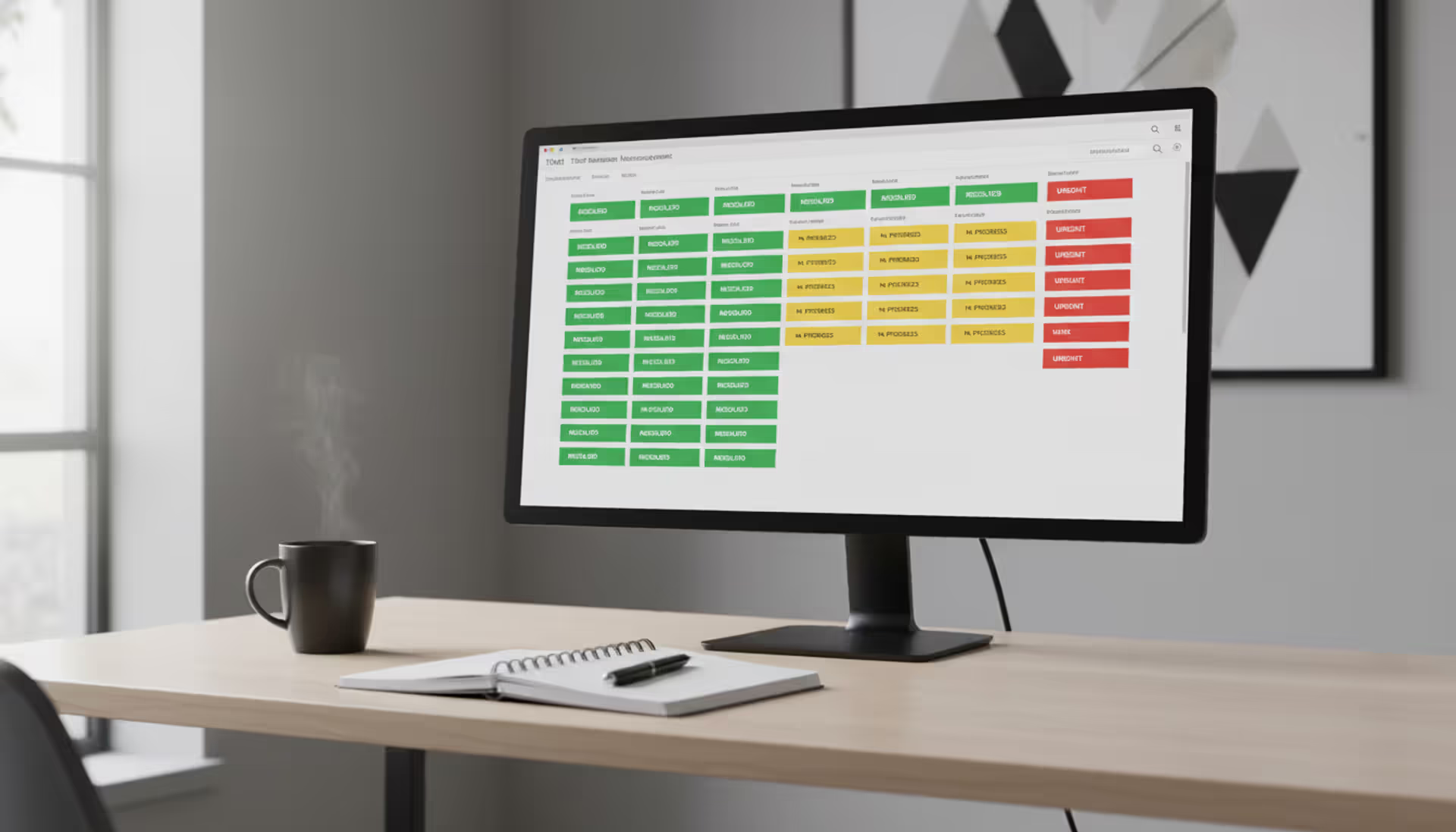
Every support team faces the same challenge: managing hundreds or thousands of customer inquiries without losing track of a single conversation. A customer support ticketing system transforms chaotic email threads and scattered messages into organized, trackable requests that your team can resolve efficiently.
When customers reach out through email, chat, social media, or phone, their questions don't disappear into a void. Instead, each inquiry becomes a numbered ticket with a complete history, assigned owner, and clear status. This structure prevents duplicate responses, ensures accountability, and gives customers confidence that their issues won't fall through the cracks.
What Is a Customer Support Ticketing System
A customer support ticketing system converts every customer inquiry into a structured record called a ticket. Think of it as a digital case file that captures the customer's question, tracks all responses, logs every interaction, and maintains a complete timeline until resolution.
When a customer sends an email to support@yourcompany.com, the system automatically generates a unique ticket number—something like #4521. That ticket contains the customer's contact information, their original message, priority level, category tags, and timestamps. As your team works on the issue, every reply, internal note, and status change gets attached to that same ticket.
The core functionality revolves around three actions: creation, tracking, and resolution. Tickets get created automatically from incoming channels or manually by support agents. The system tracks each ticket's current state—new, open, pending, or closed. Finally, when an agent resolves the issue and the customer confirms satisfaction, the ticket closes with a complete record of what happened.
Customer service ticketing differs from simple email because it adds structure. Regular email chains break when multiple people respond, customers reply to old threads about new issues, or important messages get buried in cluttered inboxes. A ticketing system prevents these problems by keeping each issue separate, visible to the entire team, and searchable by dozens of criteria.
Most systems assign a unique ID that customers can reference in follow-up conversations. This seemingly small feature eliminates the common frustration of explaining the same problem to three different agents. Anyone on your team can pull up ticket #4521 and see the complete context immediately.
Author: Ethan Marlowe;
Source: musiconmainstreet.com
How Customer Service Ticketing Systems Work
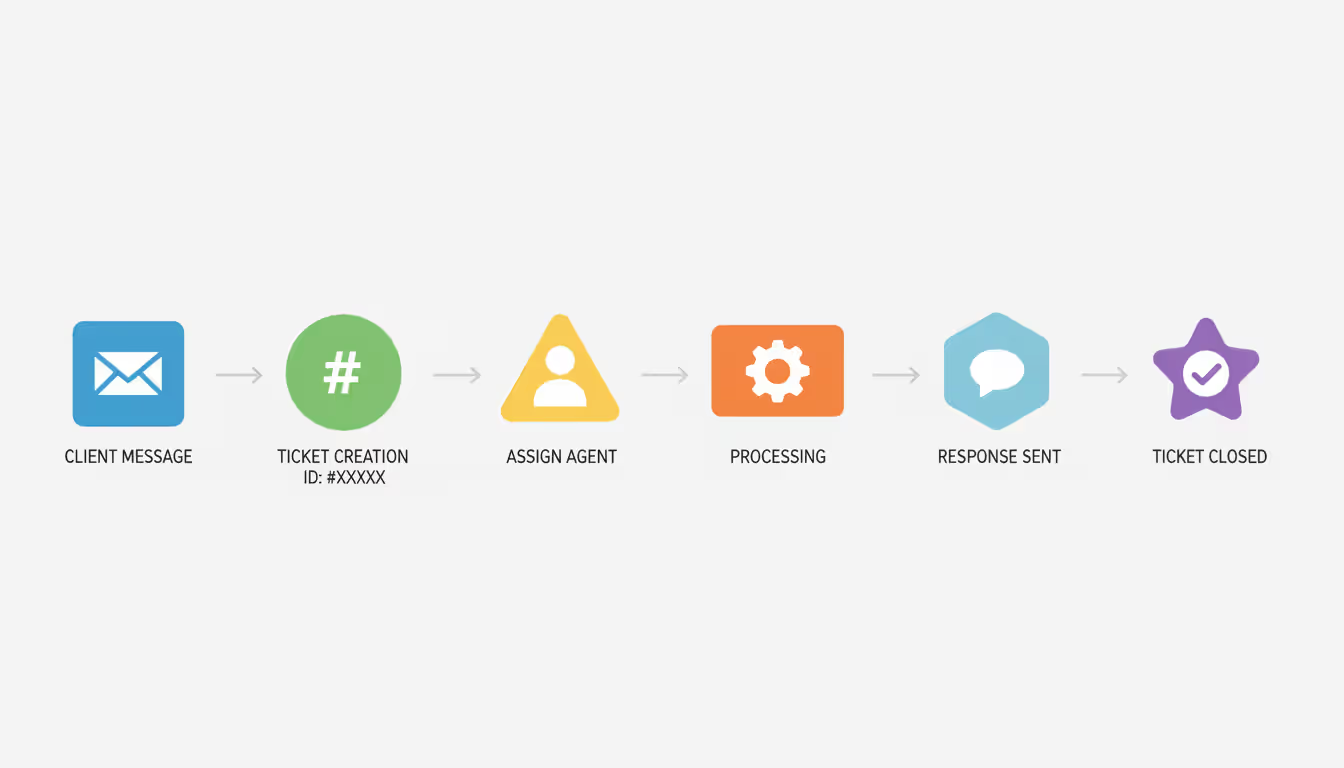
The workflow begins the moment a customer contacts you. An email arrives, a chat message pops up, or someone fills out a web form. The support desk ticketing system captures this inquiry and creates a ticket within seconds.
First, the system parses the incoming message. It extracts the sender's email address, subject line, message body, and any attachments. If the customer has contacted you before, the system links this new ticket to their profile, showing previous conversations and purchase history.
Next comes automatic categorization and routing. Modern customer helpdesk software analyzes the content using keyword matching or machine learning. An email mentioning "refund" might get tagged as billing and routed to your finance team. A message about "login error" goes to technical support with high priority.
Assignment logic varies by organization. Some teams use round-robin distribution where tickets rotate evenly among available agents. Others route based on expertise—billing questions go to billing specialists. More sophisticated setups consider agent workload, ensuring nobody gets overwhelmed while others sit idle.
Once assigned, the agent receives a notification. They open the ticket, review the customer's issue, and craft a response. When they hit send, the customer receives an email with the ticket number in the subject line. If the customer replies, their message automatically appends to the existing ticket rather than creating a duplicate.
Internal collaboration happens through private notes. An agent might write "Checked the database, found the order was processed twice" as an internal note that the customer never sees. If they need help, they can escalate the ticket to a supervisor or reassign it to another department.
Status changes mark progress. A ticket starts as "New," becomes "Open" when an agent begins work, switches to "Pending" while waiting for customer information, and finally closes as "Resolved." Some teams add custom statuses like "Waiting on Engineering" or "Scheduled for Callback."
Automation handles repetitive tasks. When a customer asks about shipping times, the system can send an instant auto-response with tracking information before an agent even sees the ticket. If a ticket sits untouched for two hours, the system can escalate it automatically. When an agent solves a common problem, they can save their response as a template for future use.
Service level agreements (SLAs) create accountability. You might promise to respond to all tickets within four hours and resolve them within 24. The system monitors these commitments, flagging tickets that approach their deadlines and generating reports on compliance rates.
Author: Ethan Marlowe;
Source: musiconmainstreet.com
Key Features to Look For
Not all ticketing systems offer the same capabilities. The features you need depend on your team size, customer volume, and support complexity.
Omnichannel Support Capabilities
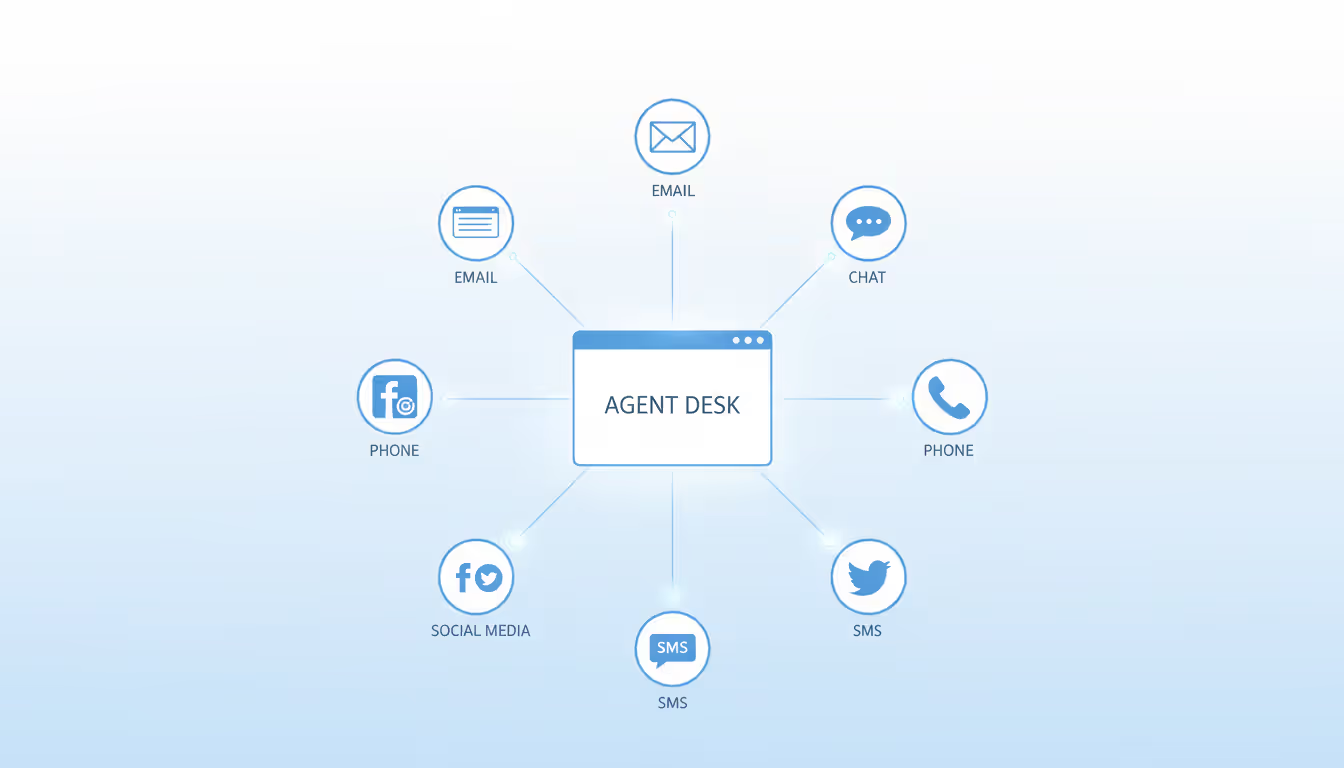
Customers contact companies through email, live chat, Facebook messages, Twitter mentions, SMS, phone calls, and web forms. An omnichannel ticketing system pulls all these channels into a single interface.
Without omnichannel support, your team juggles separate inboxes. An agent might respond to an email while missing that the same customer tweeted a complaint an hour earlier. The customer repeats themselves across channels, frustration building with each repetition.
True omnichannel means unified conversation threads. If a customer emails you Monday, chats Tuesday, and calls Wednesday—all about the same issue—those interactions appear in one ticket. The Wednesday phone agent sees the Monday email and Tuesday chat without asking the customer to recap.
Channel switching should feel seamless. A conversation that starts in chat can continue via email when the customer leaves their computer. The ticket maintains continuity regardless of how the customer chooses to communicate.
Look for systems that handle channel-specific features properly. Social media requires public and private responses. Chat needs typing indicators and quick replies. Phone integration should log call duration and offer recording. Each channel has unique requirements that generic systems often miss.
Author: Ethan Marlowe;
Source: musiconmainstreet.com
Email Integration and Management
Email remains the dominant support channel for most businesses. An email ticketing system must handle threading, formatting, attachments, and high volumes without errors.
Thread management prevents the common problem of fragmented conversations. When a customer replies to a week-old email about a new issue, the system should recognize this as a separate topic and create a new ticket rather than reopening the old one.
Email parsing needs sophistication. Customers forward messages, quote previous replies, and include lengthy signatures. The system should extract the actual new content rather than displaying walls of redundant text.
Attachment handling matters more than most teams realize. Customers send screenshots, PDFs, videos, and logs. The system must accept common file types, scan for viruses, store files securely, and make them accessible to agents without complicated downloads.
Bulk actions save hours of manual work. An agent should be able to select 50 tickets and change their status, add a tag, or send a batch update in one click. Without this capability, repetitive tasks consume valuable time.
Email-based ticketing systems work entirely through email addresses. Customers send messages to support@company.com and receive replies from the same address. These systems feel familiar and require zero learning curve for customers, but they lack the advanced features of full-platform solutions.
Automation and Routing Tools
Automation transforms support from reactive firefighting to proactive service delivery. Smart routing ensures tickets reach the right person immediately rather than bouncing between agents.
Trigger-based automation responds to specific conditions. When a ticket contains the word "urgent" in the subject, the system can automatically increase priority and notify a manager. When a customer from your enterprise plan emails, the system routes them to your senior support team.
Time-based automation handles follow-ups. If a customer doesn't respond within three days, the system can send a gentle "Are you still experiencing this issue?" message. If they confirm resolution, the ticket auto-closes. This prevents tickets from lingering indefinitely in limbo.
Smart assignment considers multiple factors simultaneously. The system might route tickets based on agent expertise, current workload, shift schedule, language skills, and customer account value—all in milliseconds.
Canned responses speed up common inquiries. An agent types a shortcode like "/refund" and the system expands it into a complete, personalized response explaining your refund policy. This maintains quality while reducing response time.
Collision detection prevents duplicate work. When two agents open the same ticket simultaneously, the system alerts them that someone else is already responding. This simple feature eliminates embarrassing situations where customers receive contradictory answers from different team members.
Types of Support Ticketing Systems
Support ticketing systems fall into several categories based on architecture, channel support, and specialization.
Email-based systems operate entirely through email protocols. Customers send messages to a support address, and the system converts them into tickets. These systems excel at simplicity and familiarity but struggle with real-time channels like chat or phone.
Omnichannel platforms integrate multiple communication channels into a unified workspace. Agents handle email, chat, social media, and phone from one interface. These systems cost more and require more setup time, but they prevent the fragmentation that occurs when channels operate independently.
Help desk platforms combine ticketing with knowledge bases, community forums, and self-service portals. They focus on reducing ticket volume by helping customers solve problems independently. The intercom ticketing system exemplifies this approach, blending support tickets with proactive messaging and customer education.
Cloud-based systems run entirely online with no local installation. You access them through a web browser, pay monthly subscription fees, and the vendor handles all maintenance and updates. Most modern systems follow this model because it offers flexibility and eliminates IT overhead.
On-premise systems install on your own servers. You control the data, customize the software extensively, and pay upfront licensing fees rather than subscriptions. Large enterprises with strict security requirements or unique compliance needs sometimes choose this route despite higher costs.
Industry-specific solutions optimize for particular sectors. Healthcare ticketing systems comply with HIPAA regulations and integrate with electronic health records. E-commerce platforms connect with shopping carts and order management systems. Financial services systems maintain audit trails for regulatory compliance.
Unified inbox, social integration, chat, phone, mobile apps
$40–$100/agent/month
Zendesk, Freshdesk
Help Desk Suite
Teams focused on self-service
Knowledge base, community forums, chatbots, analytics
$50–$150/agent/month
Intercom, HubSpot Service Hub
Enterprise Solution
Large organizations, complex needs
Advanced customization, API access, white-label options, dedicated support
$100–$300+/agent/month
Salesforce Service Cloud, ServiceNow
The best support ticketing system for your organization depends on your specific requirements rather than objective superiority. A five-person startup wastes money on enterprise features they'll never use. A 500-agent call center can't function on tools designed for small teams.
How to Choose the Right System for Your Business
Selecting customer support software requires evaluating your current situation and future growth trajectory.
Start with team size. Systems priced per agent become expensive as teams grow. If you have three agents now but plan to hire ten next year, calculate costs at the larger size. Some vendors offer volume discounts that kick in at specific thresholds.
Assess your channel mix. If 95% of inquiries arrive via email, you don't need sophisticated social media integration. But if customers increasingly contact you through Facebook and Instagram, omnichannel capabilities become essential rather than optional.
Integration requirements often determine feasibility. Your ticketing system should connect with your CRM, e-commerce platform, payment processor, and any other tools your team uses daily. Check whether integrations are native (built by the vendor), third-party (built by the other company), or require middleware like Zapier. Native integrations generally work more reliably.
Consider your team's technical expertise honestly. Some systems require developer resources for setup and customization. Others offer visual workflow builders that non-technical managers can configure. Match the system's complexity to your team's capabilities.
Budget extends beyond subscription fees. Factor in implementation costs, training time, integration development, and ongoing maintenance. A system with a $20/month price tag might cost $5,000 to set up properly, while a $60/month option might include white-glove onboarding.
Scalability matters more than most teams anticipate. Can the system handle 10x your current ticket volume? What happens when you expand to new countries or add new products? Switching ticketing systems after you've accumulated thousands of historical tickets creates massive disruption.
Trial periods reveal real-world fit. Most vendors offer 14- or 30-day trials. Use them seriously—import real data, invite your actual team, process genuine tickets. A system that looks perfect in a demo might feel clunky in daily use.
User reviews provide ground truth. Read reviews on G2, Capterra, or TrustRadius from companies similar to yours. Pay special attention to complaints about customer support quality, hidden fees, or features that don't work as advertised.
The ticketing system is not just a tool for organizing customer requests—it's the central nervous system of your support operation. Choose poorly and every interaction becomes harder. Choose well and your team gains superpowers.
— Shep Hyken, Customer Service Expert
Common Implementation Mistakes to Avoid
Even the best customer helpdesk software fails when implemented poorly. These mistakes derail support operations and frustrate teams.
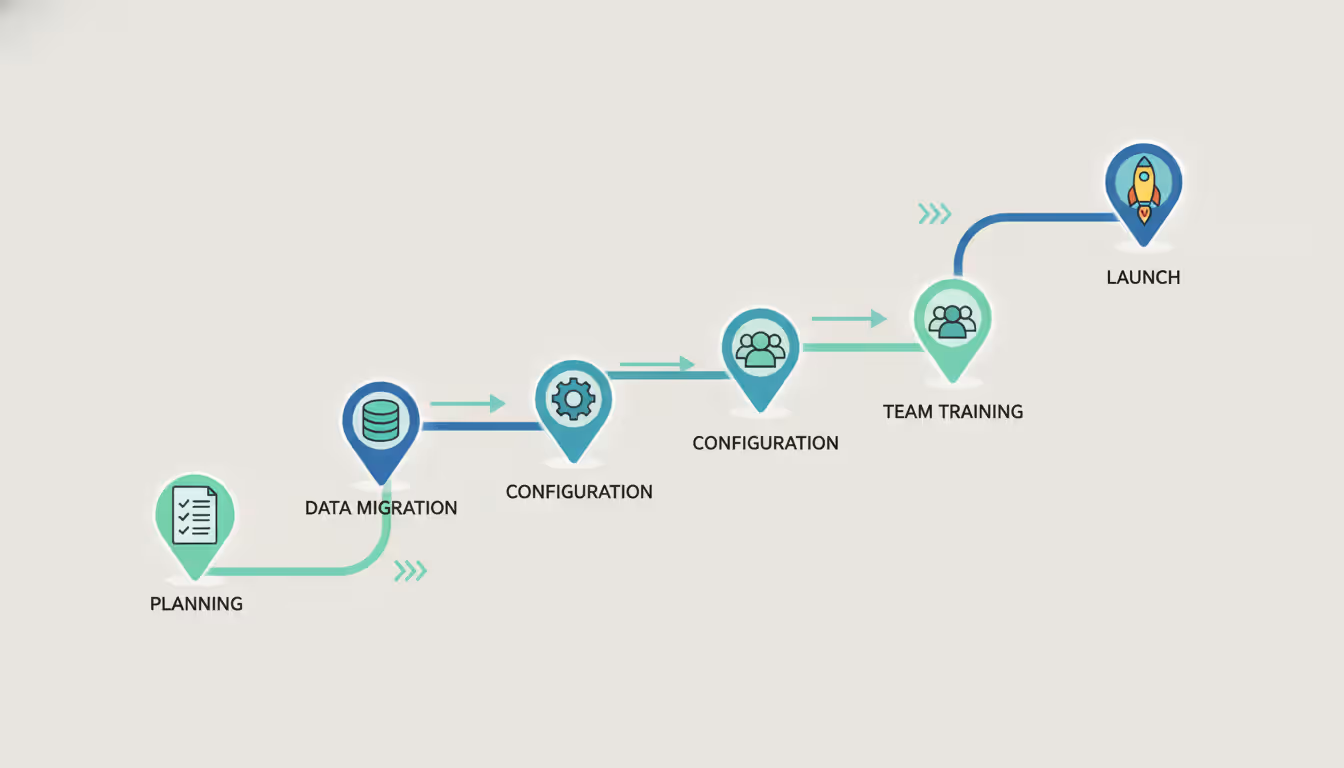
Inadequate planning causes most failures. Teams install a new system Friday afternoon expecting to be operational Monday morning. Proper implementation requires data migration, workflow configuration, integration testing, and team training—often several weeks of work.
Migrating historical data carelessly creates problems. Some teams import everything, including spam and test tickets, creating noise that obscures useful information. Others import nothing, forcing agents to check two systems during the transition period. The right approach imports recent, relevant tickets with clean formatting and accurate metadata.
Over-customization leads to unmaintainable complexity. Teams add custom fields for every conceivable data point, create dozens of ticket statuses, and build elaborate automation rules. Six months later, nobody remembers why half these customizations exist, and simple changes require hours of testing.
Under-customization causes the opposite problem. Teams use the system exactly as it comes out of the box, ignoring configuration options that would save significant time. They manually route tickets that automation could handle, or they fail to set up SLA rules that would prevent missed deadlines.
Skipping training guarantees low adoption. Agents who don't understand the system revert to email, spreadsheets, or sticky notes. They develop workarounds that defeat the entire purpose of centralized ticketing. Invest in comprehensive training during rollout and ongoing education as you add features.
Ignoring team feedback creates resentment. The agents using the support desk ticketing system daily often spot inefficiencies that managers miss. When they suggest improvements and hear nothing but silence, morale suffers and adoption drops.
Neglecting maintenance allows systems to decay. Automation rules that made sense last year might be obsolete now. Tags proliferate until nobody knows which to use. Canned responses contain outdated information. Schedule quarterly reviews to clean up and optimize your configuration.
Failing to measure results means you can't demonstrate value. Track metrics before and after implementation: average response time, resolution time, customer satisfaction scores, and tickets per agent. These numbers prove ROI and justify continued investment in the system.
Author: Ethan Marlowe;
Source: musiconmainstreet.com
Frequently Asked Questions
What's the difference between a ticketing system and help desk software?
The terms overlap significantly, but help desk software typically includes broader capabilities beyond ticketing. A pure ticketing system converts inquiries into trackable tickets and manages them through resolution. Help desk software adds knowledge bases, self-service portals, asset management, and often includes tools for IT service management beyond customer support. For customer-facing support teams, the distinction matters less than ensuring the system handles your specific channels and workflows effectively.
How much does a customer support ticketing system cost?
Pricing ranges from $10 to $300+ per agent per month depending on features and scale. Entry-level email ticketing systems start around $10–$30 per agent monthly. Mid-tier omnichannel platforms run $40–$100 per agent. Enterprise solutions with advanced customization and dedicated support cost $100–$300+ per agent. Many vendors offer volume discounts for larger teams. Factor in implementation costs, which can range from zero for simple systems to tens of thousands for enterprise deployments requiring custom integration and data migration.
Can small businesses benefit from ticketing systems?
Absolutely. Even a two-person support team benefits from organized ticket tracking. Small businesses often operate with lean teams where every hour counts. A ticketing system prevents lost emails, eliminates duplicate responses, and creates accountability without requiring additional headcount. Many vendors offer affordable plans specifically designed for small teams, with pricing starting under $20 monthly for the entire team rather than per agent. The efficiency gains typically pay for the system within the first month.
What is an omnichannel ticketing system?
An omnichannel ticketing system consolidates customer conversations from multiple channels—email, chat, social media, phone, SMS—into a unified interface. Instead of checking separate inboxes for each channel, agents see all inquiries in one queue. More importantly, when a customer contacts you through multiple channels about the same issue, the system links those conversations into a single ticket. This prevents customers from repeating themselves and ensures agents have complete context regardless of which channel the customer prefers at any given moment.
How long does it take to implement a ticketing system?
Implementation timelines range from a few hours to several months. A small team using a cloud-based email ticketing system with minimal customization can be operational in a day. Mid-sized companies implementing an omnichannel platform with integrations, data migration, and workflow automation typically need 2–6 weeks. Large enterprises deploying complex help desk solutions with extensive customization and integration requirements might spend 3–6 months on implementation. The key factors are data migration complexity, number of integrations, extent of customization, and team training requirements.
Do I need technical knowledge to set up a ticketing system?
Most modern customer support software requires no coding skills for basic setup. You can configure email addresses, create ticket categories, set up routing rules, and add team members through visual interfaces. However, advanced features like custom integrations, API connections, or complex automation workflows might require developer assistance. Many vendors offer implementation services to handle technical setup, which can be worthwhile for teams without IT resources. If you can manage email and use standard business software, you can likely handle basic ticketing system configuration independently.
Choosing and implementing a customer support ticketing system represents one of the most impactful decisions for your support operation. The right system transforms chaos into order, reduces response times, improves customer satisfaction, and makes your team more productive. The wrong system—or the right system implemented poorly—creates frustration and wastes resources.
Start by understanding your specific requirements: team size, communication channels, integration needs, and growth plans. Evaluate systems based on these criteria rather than feature lists or brand recognition. Use trial periods to test real-world fit with your actual workflows and team.
Remember that the system itself is just a tool. Success depends equally on proper implementation, comprehensive training, and ongoing optimization. Involve your team in selection and configuration decisions. Measure results consistently and adjust based on data rather than assumptions.
The investment in a quality ticketing system pays dividends daily through faster resolutions, happier customers, and support teams that can focus on solving problems rather than managing chaos.
Running a small business means wearing multiple hats. When support requests pile up in email inboxes, Slack threads, and sticky notes, tracking who's handling what becomes impossible. A ticketing system transforms chaos into clarity by centralizing every request, assigning ownership, and creating workflows your team can follow
Choosing the wrong ticketing system costs thousands in lost productivity and expensive migrations. This comprehensive comparison evaluates leading platforms across features, pricing, and real-world use cases to help you select the right solution for IT support or customer service needs
A ticketing system converts requests into structured records called tickets, preventing customer questions and IT issues from falling through the cracks. Learn how ticketing platforms work, what features matter, and how to choose the right solution for your business needs
Managing support requests without breaking the budget is possible with open source ticketing systems. This guide compares popular platforms like osTicket, Zammad, and OTRS, covering essential features, implementation considerations, and hidden costs to help you choose the right solution
The content on this website is provided for general informational and educational purposes only. It is intended to explain concepts related to event management software, ticketing systems, hybrid event platforms, and operational tools for event organisers.
All information on this website, including articles, guides, and examples, is presented for general educational purposes. Outcomes may vary depending on event size, technology choices, and organisational needs.
This website does not provide professional legal, financial, or software advice, and the information presented should not be used as a substitute for consultation with qualified event tech or IT professionals.
The website and its authors are not responsible for any errors or omissions, or for any outcomes resulting from decisions made based on the information provided on this website.